veritas
volume manager installation step by step guide
This post describe about installation of VXVM
on Solaris node and initialization issues with vxvm after the
package installation. Unlike other packages installation,we have
installer available in storage foundation bundle to minimize the
complex.So no need to use pkgadd commands unless until there is an issue with
the installer.Here is step by step guide for vxvm installation with putty
output.
Environment:
Operating system:Solaris 10
Storage Foundation:6.0
you can download the veritas package bundles from Symantec website freely by just signing up in to.
Download the packages from Symantec and keep the package
under /var/tmp.
bash-3.00#
ls -lrt
drwxr-xr-x 15 root
root 22 Nov 29 2011 dvd2-sol_x64
-rwx------ 1 root
root 924151296 Oct 3 23:50
VRTS_SF_HA_Solutions_6.0_Solaris_x64.tar
bash-3.00#
cd dvd2-sol_x64
bash-3.00#
ls -lrt |grep installer
total 95
-rwxr-xr-x 1 root
root 5278 Nov 29 2011 installer
Note:I
have removed some unnecessary output in the installation process.
bash-3.00#
./installer
Logs are
being written to /var/tmp/installer-201210032354IFr while installer is in
progress.
Storage Foundation and High Availability
Solutions 6.0 Install Program
Use the
menu below to continue.
Task Menu:
P) Perform
a Pre-Installation Check I) Install
a Product
C)
Configure an Installed Product G)
Upgrade a Product
O) Perform
a Post-Installation Check U)
Uninstall a Product
L) License
a Product S) Start a
Product
D) View
Product Descriptions X) Stop
a Product
R) View
Product Requirements ?) Help
Enter a
Task: [P,I,C,G,O,U,L,S,D,X,R,?] I
1)
Veritas Dynamic Multi-Pathing (DMP)
2)
Veritas Cluster Server (VCS)
3)
Veritas Storage Foundation (SF)
4)
Veritas Storage Foundation and High Availability (SFHA)
5)
Veritas Storage Foundation Cluster File System HA
6)
Symantec VirtualStore (SVS)
7)
Veritas Storage Foundation for Oracle RAC
b) Back to previous menu
Select a
product to install: [1-7,b,q] 3
Do you
agree with the terms of the End User License Agreement as specified in the
storage_foundation_high_availability/EULA/en/EULA_SFHA_Ux_6.0.pdf
file present on media? [y,n,q,?] y
Veritas Storage Foundation 6.0 Install
Program
1)
Install minimal required packages - XXX MB required
2)
Install recommended packages - XXXX MB required
3)
Install all packages - XXXX MB required
4)
Display packages to be installed for each option
Select the
packages to be installed on all systems? [1-4,q,?] (2)
Enter the
Solaris x64 system names separated by spaces: [q,?] node1
Veritas Storage Foundation and High
Availability 6.0 Install Program
node1
Logs are
being written to /var/tmp/installer-201210032354IFr while installer is in
progress
Verifying systems: 100%
Estimated time remaining: (mm:ss) 0:00
8 of 8
Checking system
communication..........................Done
Checking release
compatibility.........................Done
Checking installed product
............................Done
Checking prerequisite patches and
packages.............Done
Checking platform version
.............................Done
Checking file system free space
.......................Done
Checking product licensing
............................Done
Performing product prechecks
..........................Done
System
verification checks completed
Press
[Enter] to continue:
1)
Enter a valid license key
2)
Enable keyless licensing and complete system licensing later
How would
you like to license the systems? [1-2,q] (2)
Checking
system licensing
1)
SF Standard HA
2)
SF Enterprise HA
b) Back to previous menu
Select
product mode to license: [1-2,b,q,?] (1)
Would you
like to enable replication? [y,n,q] (n)
That's all
about the storage foundation installation.
Just reboot
the system to use VXVM.
bash-3.00#
/usr/sbin/shutdown -y -i6 -g0
Troubleshooting
vxvm initialization issue
After the system reboot,you may get below error messages while
executing the commands.
bash-3.00#
vxdctl enable
VxVM vxdctl
ERROR V-5-1-1589 enable failed: Volboot file not loaded
bash-3.00#
vxdisk list
VxVM vxdisk
ERROR V-5-1-684 IPC failure: Configuration daemon is not accessible.
To fix the above errors,
bash-3.00#
vxconfigd
bash-3.00#
vxdctl init
bash-3.00#
vxdctl enable
bash-3.00#
vxdisk -e list
DEVICE TYPE
DISK GROUP STATUS OS_NATIVE_NAME ATTR
disk_0
auto:ZFS - -
ZFS c1t0d0s2 -
Now you can see that init command created volboot for SF.
bash-3.00#
cat /etc/vx/volboot
volboot 3.1
0.1 110
hostid
node1
hostguid
{b6208f08-0d8c-11e2-8046-000c2985ec00}.
VXVM – DISK
Operations tutorial
VXVM(veritas
volume manager training) 2 of 10
In this post, we will see how to scan the disks and bringing the disks in to veritas volume manager control and various disks operations. Instead of digging in to theory we will concentrate more on piratical. Here we will see about how to scan new disk in vxvm,disk naming convention and how to bring it in veritas control.Adding disk in to diskgroup ,we will see in diskgroup operation.
Once the VXVM installation is completed ,you good to start work on the below things.
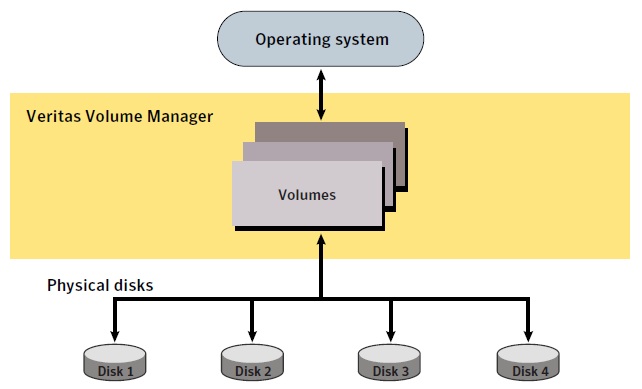
VxVM presents the disks in a disk array as volumes to the operating system
in below manner.
In this post, we will see how to scan the disks and bringing the disks in to veritas volume manager control and various disks operations. Instead of digging in to theory we will concentrate more on piratical. Here we will see about how to scan new disk in vxvm,disk naming convention and how to bring it in veritas control.Adding disk in to diskgroup ,we will see in diskgroup operation.
Once the VXVM installation is completed ,you good to start work on the below things.
VxVM presents the disks in a disk array as volumes to the operating system
in below manner.
1.Veritas Naming Scheme
Before bringing the disk in to veritas control you should know
about the disk naming convention in veritas.In VXVM there are two
type of disk naming schemes available.
1. Operating system-based naming scheme
2. Enclosure based naming scheme.
To avoid confusion with OS based
names(i.e format),please check it,which is set in your system.
bash-3.00#
vxddladm get namingscheme
NAMING_SCHEME PERSISTENCE LOWERCASE USE_AVID
======================================================
Enclosure Based Yes Yes Yes
bash-3.00# vxdisk list
DEVICE TYPE DISK GROUP STATUS
disk_0 auto:none - - online invalid
disk_1 auto:none - - online invalid
disk_2 auto:ZFS - - ZFS
disk_3 auto:ZFS - - ZFS
NAMING_SCHEME PERSISTENCE LOWERCASE USE_AVID
======================================================
Enclosure Based Yes Yes Yes
bash-3.00# vxdisk list
DEVICE TYPE DISK GROUP STATUS
disk_0 auto:none - - online invalid
disk_1 auto:none - - online invalid
disk_2 auto:ZFS - - ZFS
disk_3 auto:ZFS - - ZFS
As per the above output,the system was set to use enclosure based
naming scheme. Anytime you can change the naming scheme on the fly.There will
be no impact by doing this.
To change the Operating system based naming scheme,
To change the Operating system based naming scheme,
bash-3.00#
vxddladm set namingscheme=osn
bash-3.00# vxdisk list
DEVICE TYPE DISK GROUP STATUS
c1t0d0s2 auto:ZFS - - ZFS
c1t3d0 auto:none - - online invalid
c1t4d0 auto:ZFS - - ZFS
c1t5d0 auto:none - - online invalid
bash-3.00# vxdisk list
DEVICE TYPE DISK GROUP STATUS
c1t0d0s2 auto:ZFS - - ZFS
c1t3d0 auto:none - - online invalid
c1t4d0 auto:ZFS - - ZFS
c1t5d0 auto:none - - online invalid
You can set it back to enclosure based using below command.
bash-3.00#
vxddladm set namingscheme=ebn
You can match the OS native names(i.e format) with VXVM enclose
based names using the below command.
bash-3.00#
vxdisk -e list
DEVICE TYPE DISK GROUP STATUS OS_NATIVE_NAME ATTR
disk_0 auto:none - - online invalid c1t3d0 -
disk_1 auto:none - - online invalid c1t5d0 -
disk_2 auto:ZFS - - ZFS c1t4d0 -
disk_3 auto:ZFS - - ZFS c1t0d0s2 -
DEVICE TYPE DISK GROUP STATUS OS_NATIVE_NAME ATTR
disk_0 auto:none - - online invalid c1t3d0 -
disk_1 auto:none - - online invalid c1t5d0 -
disk_2 auto:ZFS - - ZFS c1t4d0 -
disk_3 auto:ZFS - - ZFS c1t0d0s2 -
2.Discover New Disks in veritas:
To Scan a new disk in OS level,
To Scan a new disk in OS level,
bash-3.00#
cfgadm -al
bash-3.00# /usr/sbin/devfsadm -Cvc disk
bash-3.00# /usr/sbin/devfsadm -Cvc disk
After scanning the disk in OS,Scan the disks in veritas level by
using the below command.
bash-3.00#
vxdisk scandisks
Note:In older version we may used “vxdctl enable” or “vxconfigd -k” to
scan new disks by restarting it vxvm daemon.Symantec recommending to
use the above command to scan new disks.
Trigger DDL(Device Discovery Layer) to again assign names to
DMP devices
DMP devices
bash-3.00#
vxddladm assign names
Now you can see new disks
bash-3.00#
vxdisk -e list
DEVICE TYPE DISK GROUP STATUS OS_NATIVE_NAME ATTR
disk_0 auto:cdsdisk - - online c1t3d0 -
disk_1 auto:cdsdisk - - online c1t5d0 -
disk_2 auto:ZFS - - ZFS c1t4d0 -
disk_3 auto:ZFS - - ZFS c1t0d0s2 -
disk_4 auto:cdsdisk - - online c1t6d0 -
disk_5 auto:cdsdisk - - online c1t2d0 -
disk_6 auto:cdsdisk - - online c1t1d0 -
DEVICE TYPE DISK GROUP STATUS OS_NATIVE_NAME ATTR
disk_0 auto:cdsdisk - - online c1t3d0 -
disk_1 auto:cdsdisk - - online c1t5d0 -
disk_2 auto:ZFS - - ZFS c1t4d0 -
disk_3 auto:ZFS - - ZFS c1t0d0s2 -
disk_4 auto:cdsdisk - - online c1t6d0 -
disk_5 auto:cdsdisk - - online c1t2d0 -
disk_6 auto:cdsdisk - - online c1t1d0 -
3.Bringing the disk in to veritas control
vxdisksetup command brings the disks in to veritas volume
manager control.By default this will format the disk in CDS(Cross Data platform
Sharing ) .Other formats are sliced and simple. sliced will be used for boot
disks.
bash-3.00#
/etc/vx/bin/vxdisksetup -i disk_0
bash-3.00# /etc/vx/bin/vxdisksetup -i disk_1
bash-3.00# /etc/vx/bin/vxdisksetup -i disk_4
bash-3.00# /etc/vx/bin/vxdisksetup -i disk_5
bash-3.00# /etc/vx/bin/vxdisksetup -i disk_6
bash-3.00# /etc/vx/bin/vxdisksetup -i disk_1
bash-3.00# /etc/vx/bin/vxdisksetup -i disk_4
bash-3.00# /etc/vx/bin/vxdisksetup -i disk_5
bash-3.00# /etc/vx/bin/vxdisksetup -i disk_6
If you want to setup the disk in specific format,you can
use the below syntax.
#vxdisksetup
-i disk_XX format=cds or simple or sliced
By Checking the disk status,you will come to know how its formated
and disk
status.
status.
bash-3.00#
vxdisk list
DEVICE TYPE DISK GROUP STATUS
disk_0 auto:cdsdisk - - online
disk_1 auto:cdsdisk - - online
disk_2 auto:ZFS - - ZFS
disk_3 auto:ZFS - - ZFS
disk_4 auto:cdsdisk - - online
disk_5 auto:cdsdisk - - online
disk_6 auto:cdsdisk - - online
DEVICE TYPE DISK GROUP STATUS
disk_0 auto:cdsdisk - - online
disk_1 auto:cdsdisk - - online
disk_2 auto:ZFS - - ZFS
disk_3 auto:ZFS - - ZFS
disk_4 auto:cdsdisk - - online
disk_5 auto:cdsdisk - - online
disk_6 auto:cdsdisk - - online
VXVM
Tutorial3 – Diskgroup Operations
VXVM(veritas volume manager training) 3 of 10
The vxdg utility performs various diskgroup operations
that includes the creation of disk groups, addition of disks in to
diskgroup,removing disk from diskgroup.This command performs disk
group imports and deports as well.Here we are going to see how create a new
diskgroup and adding disks in existing diskgroup.In the end of the article we
will see how to backup the diskgroup configuration.
In the below output you can see, we have five disks which are in
VXVM control. We have brought the disk in to vxvm control using
vxdisksetup.
uarena#vxdisk
list
DEVICE TYPE DISK GROUP STATUS
disk_0 auto:cdsdisk - - online
disk_1 auto:cdsdisk - - online
disk_2 auto:ZFS - - ZFS
disk_3 auto:ZFS - - ZFS
disk_4 auto:cdsdisk - - online
disk_5 auto:cdsdisk - - online
disk_6 auto:cdsdisk - - online
DEVICE TYPE DISK GROUP STATUS
disk_0 auto:cdsdisk - - online
disk_1 auto:cdsdisk - - online
disk_2 auto:ZFS - - ZFS
disk_3 auto:ZFS - - ZFS
disk_4 auto:cdsdisk - - online
disk_5 auto:cdsdisk - - online
disk_6 auto:cdsdisk - - online
Task:1-Creating the new disk group:
uarena#vxdg
init UXDG UXDISK1=disk_0 UXDISK2=disk_1
uarena#vxdisk list
DEVICE TYPE DISK GROUP STATUS
disk_0 auto:cdsdisk UXDISK1 UXDG online
disk_1 auto:cdsdisk UXDISK2 UXDG online
disk_2 auto:ZFS - - ZFS
disk_3 auto:ZFS - - ZFS
disk_4 auto:cdsdisk - - online
disk_5 auto:cdsdisk - - online
disk_6 auto:cdsdisk - - online
uarena#vxdisk list
DEVICE TYPE DISK GROUP STATUS
disk_0 auto:cdsdisk UXDISK1 UXDG online
disk_1 auto:cdsdisk UXDISK2 UXDG online
disk_2 auto:ZFS - - ZFS
disk_3 auto:ZFS - - ZFS
disk_4 auto:cdsdisk - - online
disk_5 auto:cdsdisk - - online
disk_6 auto:cdsdisk - - online
Now you can see we have created new diskgroup
UXDG using disk_0 & disk_1 and we have assigned the meaning full name to
disks.
Task:2-Addition of disk:
If you want to add the new disk in
to existing diskgroup, bring the disk in to vxvm control using
vxdisksetup and add it using below command.
uarena#vxdg
-g UXDG adddisk UXDISK3=disk_4
uarena#vxdisk list
DEVICE TYPE DISK GROUP STATUS
disk_0 auto:cdsdisk UXDISK1 UXDG online
disk_1 auto:cdsdisk UXDISK2 UXDG online
disk_2 auto:ZFS - - ZFS
disk_3 auto:ZFS - - ZFS
disk_4 auto:cdsdisk UXDISK3 UXDG online
disk_5 auto:cdsdisk - - online
disk_6 auto:cdsdisk - - online
uarena#vxdisk list
DEVICE TYPE DISK GROUP STATUS
disk_0 auto:cdsdisk UXDISK1 UXDG online
disk_1 auto:cdsdisk UXDISK2 UXDG online
disk_2 auto:ZFS - - ZFS
disk_3 auto:ZFS - - ZFS
disk_4 auto:cdsdisk UXDISK3 UXDG online
disk_5 auto:cdsdisk - - online
disk_6 auto:cdsdisk - - online
Task:3-Removing the disk:
You can remove the disk any time from DG if it’s not used in any
volume.
uarena#vxdg
-g UXDG rmdisk UXDISK3
uarena#vxdisk list
DEVICE TYPE DISK GROUP STATUS
disk_0 auto:cdsdisk UXDISK1 UXDG online
disk_1 auto:cdsdisk UXDISK2 UXDG online
disk_2 auto:ZFS - - ZFS
disk_3 auto:ZFS - - ZFS
disk_4 auto:cdsdisk - - online
disk_5 auto:cdsdisk - - online
disk_6 auto:cdsdisk - - online
uarena#vxdisk list
DEVICE TYPE DISK GROUP STATUS
disk_0 auto:cdsdisk UXDISK1 UXDG online
disk_1 auto:cdsdisk UXDISK2 UXDG online
disk_2 auto:ZFS - - ZFS
disk_3 auto:ZFS - - ZFS
disk_4 auto:cdsdisk - - online
disk_5 auto:cdsdisk - - online
disk_6 auto:cdsdisk - - online
Task:4-Maximum size of volume:
If you want to find out how much size volume we can create
from the diskgroup, use the below command.In other word to you can
determine the free space of the diskgroup.
uarena#vxassist
-g UXDG maxsize
Maximum volume size: 284672 (139Mb)
uarena#vxassist -g UXDG maxsize layout=mirror
Maximum volume size: 10240 (60Mb)
uarena#vxassist -g UXDG maxsize layout=stripe
Maximum volume size: 284672 (139Mb)
uarena#vxdg -g UXDG free
DISK DEVICE TAG OFFSET LENGTH FLAGS
UXDISK1 disk_0 disk_0 0 143056 -
UXDISK2 disk_1 disk_1 0 143056 -
Maximum volume size: 284672 (139Mb)
uarena#vxassist -g UXDG maxsize layout=mirror
Maximum volume size: 10240 (60Mb)
uarena#vxassist -g UXDG maxsize layout=stripe
Maximum volume size: 284672 (139Mb)
uarena#vxdg -g UXDG free
DISK DEVICE TAG OFFSET LENGTH FLAGS
UXDISK1 disk_0 disk_0 0 143056 -
UXDISK2 disk_1 disk_1 0 143056 -
Task:5-Deporting diskgroup:
After un-mounting the volumes , you can deport the diskgroup.To
see the imported diskgroup
uarena#vxdg
list
NAME STATE ID
UXDG enabled,cds 1364022395.37.sfos
uarena#vxdg deport UXDG
By default vxdisk output will not show the deported diskgroup tag.
uarena#vxdisk list
DEVICE TYPE DISK GROUP STATUS
disk_0 auto:cdsdisk - - online
disk_1 auto:cdsdisk - - online
disk_2 auto:ZFS - - ZFS
disk_3 auto:ZFS - - ZFS
disk_4 auto:cdsdisk - - online
disk_5 auto:cdsdisk - - online
disk_6 auto:cdsdisk - - online
NAME STATE ID
UXDG enabled,cds 1364022395.37.sfos
uarena#vxdg deport UXDG
By default vxdisk output will not show the deported diskgroup tag.
uarena#vxdisk list
DEVICE TYPE DISK GROUP STATUS
disk_0 auto:cdsdisk - - online
disk_1 auto:cdsdisk - - online
disk_2 auto:ZFS - - ZFS
disk_3 auto:ZFS - - ZFS
disk_4 auto:cdsdisk - - online
disk_5 auto:cdsdisk - - online
disk_6 auto:cdsdisk - - online
To find the deported diskgroup disks,
uarena#vxdisk
-o alldgs list
DEVICE TYPE DISK GROUP STATUS
disk_0 auto:cdsdisk - (UXDG) online
disk_1 auto:cdsdisk - (UXDG) online
disk_2 auto:ZFS - - ZFS
disk_3 auto:ZFS - - ZFS
disk_4 auto:cdsdisk - - online
disk_5 auto:cdsdisk - - online
disk_6 auto:cdsdisk - - online
DEVICE TYPE DISK GROUP STATUS
disk_0 auto:cdsdisk - (UXDG) online
disk_1 auto:cdsdisk - (UXDG) online
disk_2 auto:ZFS - - ZFS
disk_3 auto:ZFS - - ZFS
disk_4 auto:cdsdisk - - online
disk_5 auto:cdsdisk - - online
disk_6 auto:cdsdisk - - online
Task:6–Importing the deported
diskgroup:
uarena#vxdg
import UXDG
uarena#vxdg list
NAME STATE ID
UXDG enabled,cds 1364022395.37.sfos
uarena#vxdisk list |grep UXDG
disk_0 auto:cdsdisk UXDISK1 UXDG online
disk_1 auto:cdsdisk UXDISK2 UXDG online
uarena#vxdg list
NAME STATE ID
UXDG enabled,cds 1364022395.37.sfos
uarena#vxdisk list |grep UXDG
disk_0 auto:cdsdisk UXDISK1 UXDG online
disk_1 auto:cdsdisk UXDISK2 UXDG online
Sometimes you may need to use -C flag to import
the cluster diskgroup to clear the VCS lock.
# vxdg -C import DG_NAME
Task:7-Re-Naming the Diskgroup:
You can’t the rename the diskgroup while its in imported state.In
a order to rename the DG, you need to re-import with new name.
uarena#vxdg
deport UXDG
uarena#vxdg -n NEWDG import UXDG
uarena#vxdg list
NAME STATE ID
NEWDG enabled,cds 1364022395.37.sfos
uarena#vxdg -n NEWDG import UXDG
uarena#vxdg list
NAME STATE ID
NEWDG enabled,cds 1364022395.37.sfos
Task:8-Diskgroup configuration backup/restore:
Whenever there is a configuration change in
diskgroup, automatically vxvm backup the new configuration under
/etc/vx/cbr/bk/
bash-3.00#
ls -lrt /etc/vx/cbr/bk
total 6
drwxr-xr-x 14 root root 18 Mar 27 19:18 UXDG.1364022395.37.sfos
drwxr-xr-x 2 root root 6 Mar 27 21:21 UXDG.1364398489.45.sfos
total 6
drwxr-xr-x 14 root root 18 Mar 27 19:18 UXDG.1364022395.37.sfos
drwxr-xr-x 2 root root 6 Mar 27 21:21 UXDG.1364398489.45.sfos
To take current configuration backup,
#
/etc/vx/bin/vxconfigbackup
VxVM vxconfigbackup ERROR V-5-2-3694 Configuration Copy for diskgroup UXDG has not changed since last backup (Wed Mar 27 21:21:39 IST 2013). Backup is not necessary.
VxVM vxconfigbackup ERROR V-5-2-3694 Configuration Copy for diskgroup UXDG has not changed since last backup (Wed Mar 27 21:21:39 IST 2013). Backup is not necessary.
Since there is no configuration chnages VXVM refuse to take
backup.Here i am doing small changes.
#
/etc/vx/bin/vxresize -g UXDG oravol1 +20M
# /etc/vx/bin/vxconfigbackup
Start backing up diskgroup UXDG to
/etc/vx/cbr/bk/UXDG.1364474089.57.sfos ...
VxVM NOTICE V-5-2-3100 Backup complete for diskgroup: UXDG
# /etc/vx/bin/vxconfigbackup
Start backing up diskgroup UXDG to
/etc/vx/cbr/bk/UXDG.1364474089.57.sfos ...
VxVM NOTICE V-5-2-3100 Backup complete for diskgroup: UXDG
Note:Default configuration location will be /etc/vx/cbr/bk/
To take the current configuration to specific location,
# /etc/vx/bin/vxconfigbackup
-l /var/tmp
Start backing up diskgroup UXDG to /var/tmp/UXDG.1364398489.45.sfos.......
VxVM NOTICE V-5-2-3100 Backup complete for diskgroup: UXDG
# ls -lrt /var/tmp/UXDG.1364398489.45.sfos
total 48473
-rw-r--r-- 1 root root Mar28 17:38 1364398489.45.sfos.diskinfo
-rw-r--r-- 1 root root Mar28 17:38 1364398489.45.sfos.cfgrec
-rw-r--r-- 1 root root Mar28 17:39 1364398489.45.sfos.binconfig
-rw-r--r-- 1 root root Mar28 17:39 1364398489.45.sfos.dginfo
Start backing up diskgroup UXDG to /var/tmp/UXDG.1364398489.45.sfos.......
VxVM NOTICE V-5-2-3100 Backup complete for diskgroup: UXDG
# ls -lrt /var/tmp/UXDG.1364398489.45.sfos
total 48473
-rw-r--r-- 1 root root Mar28 17:38 1364398489.45.sfos.diskinfo
-rw-r--r-- 1 root root Mar28 17:38 1364398489.45.sfos.cfgrec
-rw-r--r-- 1 root root Mar28 17:39 1364398489.45.sfos.binconfig
-rw-r--r-- 1 root root Mar28 17:39 1364398489.45.sfos.dginfo
Display the configuration file in readable
format:
#cd
/etc/vx/cbr/bk/UXDG.1364474089.57.sfos
# cat 1364474089.57.sfos.cfgrec |vxprint -D - -htr
Disk group: UXDG
dg UXDG default default 25000 1364474089.57.sfos
dm UXDISK1 disk_0 auto 65536 143056 -
dm UXDISK2 disk_1 auto 65536 143056 -
# cat 1364474089.57.sfos.cfgrec |vxprint -D - -htr
Disk group: UXDG
dg UXDG default default 25000 1364474089.57.sfos
dm UXDISK1 disk_0 auto 65536 143056 -
dm UXDISK2 disk_1 auto 65536 143056 -
v oravol1
- ENABLED ACTIVE
143360 SELECT -
fsgen
pl oravol1-01 oravol1 ENABLED ACTIVE 143360 CONCAT - RW
sd UXDISK1-01 oravol1-01 UXDISK1 0 143056 0 disk_0 ENA
sd UXDISK2-01 oravol1-01 UXDISK2 0 304 143056 disk_1 ENA
pl oravol1-01 oravol1 ENABLED ACTIVE 143360 CONCAT - RW
sd UXDISK1-01 oravol1-01 UXDISK1 0 143056 0 disk_0 ENA
sd UXDISK2-01 oravol1-01 UXDISK2 0 304 143056 disk_1 ENA
To restore the diskgroup configuration,
To pre-commit the changes run the following
#/etc/vx/bin/vxconfigrestore -p
UXDG
To commit the changes after the precommit
#/etc/vx/bin/vxconfigrestore -c
UXDG
To abort the pre-commit:
#/etc/vx/bin/vxconfigrestore -d
UXDG
To confirm that disk group is ok:
#vxprint -g UXDG
VXVM
Tutorial4 – Volume Operations
VXVM(veritas volume manager training) 4 of 10
VxVM builds volume using virtual objects of VM disks, disk groups, subdisks, and plexes.These virtual objects can organized easily using vxassist command to create new volume.Here we are going to see about how to create a new volumes with different layout and volume redundancy.In the end of the article we see how to destroy the volume in details. Here the assumtion is we have configured diskgroup with the name of UXDG.
VxVM builds volume using virtual objects of VM disks, disk groups, subdisks, and plexes.These virtual objects can organized easily using vxassist command to create new volume.Here we are going to see about how to create a new volumes with different layout and volume redundancy.In the end of the article we see how to destroy the volume in details. Here the assumtion is we have configured diskgroup with the name of UXDG.
bash-3.00#
vxdg list
NAME STATE ID
UXDG enabled,cds 1364022395.37.sfos
NAME STATE ID
UXDG enabled,cds 1364022395.37.sfos
1.Creating new volume
Syntax:
#vxassist
-g diskgroup make vol_name size layout=format disk-name
1.1 Concatenation volume:
Concatenation volume maps the data in a linear manner
using one or more subdisks in a single plex.No redundancy and
single drive failure destroys the entire volume.
# vxassist
-g UXDG make uxoravol1 50M
Note:If we didn't specify the format,by default VXVM will make the volume as concatenation.
To display volume details,
# vxprint -hvt
Disk group: UXDG
v uxoravol1 - ENABLED ACTIVE 102400 SELECT - fsgen
pl uxoravol1-01 uxoravol1 ENABLED ACTIVE 102400 CONCAT - RW
sd UXDISK1-01 uxoravol1-01 UXDISK1 0 102400 0 disk_0 ENA
v - volume - uxoravol1
pl - Plex - uxoravol1-01
sd - Subdisk - UXDISK1-01
Note:If we didn't specify the format,by default VXVM will make the volume as concatenation.
To display volume details,
# vxprint -hvt
Disk group: UXDG
v uxoravol1 - ENABLED ACTIVE 102400 SELECT - fsgen
pl uxoravol1-01 uxoravol1 ENABLED ACTIVE 102400 CONCAT - RW
sd UXDISK1-01 uxoravol1-01 UXDISK1 0 102400 0 disk_0 ENA
v - volume - uxoravol1
pl - Plex - uxoravol1-01
sd - Subdisk - UXDISK1-01
As per the above output,subdisk(UXDISK1-01) has been created using
UXDISK1 and plex(uxoravol1-01) is sitting on top of subdisk. On top of the plex
virtual layer, volume is placed. These virtual layer provides more flexible on
volume level operation.
If you want to make the volume using the specific disk,
bash-3.00#
vxassist -g UXDG make uxoravol1 50M UXDISK1
Once you have created the volume,you can use mkfs
to create vxfs filesystem.To create VXFS filesystem
# mkfs -F
vxfs /dev/vx/rdsk/UXDG/uxoravol1
version 9 layout
102400 sectors, 51200 blocks of size 1024, log size 1024 blocks
rcq size 1024 blocks
largefiles supported
version 9 layout
102400 sectors, 51200 blocks of size 1024, log size 1024 blocks
rcq size 1024 blocks
largefiles supported
To create a new mountpoint and mount,
# mkdir
/uxoravol1
# mount -F vxfs /dev/vx/dsk/UXDG/uxoravol1 /uxoravol1
# df -h /uxoravol1
Filesystem size used avail capacity Mounted on
/dev/vx/dsk/UXDG/uxoravol1 50M 3.1M 44M 7% /uxoravol1
# mount -F vxfs /dev/vx/dsk/UXDG/uxoravol1 /uxoravol1
# df -h /uxoravol1
Filesystem size used avail capacity Mounted on
/dev/vx/dsk/UXDG/uxoravol1 50M 3.1M 44M 7% /uxoravol1
1.2 Striped volume:
Striping maps data to two or more physical disks for high performance volumes.In this volume two or more subdisks which are coming from two or more physical disks forms stripped plex.No redundancy and single drive failure destroys the entire volume.
Striping maps data to two or more physical disks for high performance volumes.In this volume two or more subdisks which are coming from two or more physical disks forms stripped plex.No redundancy and single drive failure destroys the entire volume.
#vxassist
-g UXDG make urstripe 100M UXDISK1 UXDISK2 UXDISK3 layout=stripe stripeunit=32k
bash-3.00# vxprint -hvt
Disk group: UXDG
v urstripe - ENABLED ACTIVE 204800 SELECT urstripe-01 fsgen
pl urstripe-01 urstripe ENABLED ACTIVE 204864 STRIPE 3/64 RW
sd UXDISK1-01 urstripe-01 UXDISK1 0 68288 0/0 disk_0 ENA
sd UXDISK2-01 urstripe-01 UXDISK2 0 68288 1/0 disk_1 ENA
sd UXDISK3-01 urstripe-01 UXDISK3 0 68288 2/0 disk_4 ENA
bash-3.00# vxprint -hvt
Disk group: UXDG
v urstripe - ENABLED ACTIVE 204800 SELECT urstripe-01 fsgen
pl urstripe-01 urstripe ENABLED ACTIVE 204864 STRIPE 3/64 RW
sd UXDISK1-01 urstripe-01 UXDISK1 0 68288 0/0 disk_0 ENA
sd UXDISK2-01 urstripe-01 UXDISK2 0 68288 1/0 disk_1 ENA
sd UXDISK3-01 urstripe-01 UXDISK3 0 68288 2/0 disk_4 ENA
To create a filesystem and mount it
# mkfs -F
vxfs /dev/vx/rdsk/UXDG/urstripe
version 9 layout 204800 sectors, 102400 blocks of size 1024, log size 1024 blocks rcq size 1024 blocks largefiles supported
bash-3.00# mkdir /stripeoravol1
# mount -F vxfs /dev/vx/dsk/UXDG/urstripe /stripeoravol1
# df -h /stripeoravol1
Filesystem size used avail capacity Mounted on
/dev/vx/dsk/UXDG/urstripe 100M 3.1M 91M 4% /stripeoravol1
version 9 layout 204800 sectors, 102400 blocks of size 1024, log size 1024 blocks rcq size 1024 blocks largefiles supported
bash-3.00# mkdir /stripeoravol1
# mount -F vxfs /dev/vx/dsk/UXDG/urstripe /stripeoravol1
# df -h /stripeoravol1
Filesystem size used avail capacity Mounted on
/dev/vx/dsk/UXDG/urstripe 100M 3.1M 91M 4% /stripeoravol1
1.3 Mirror volume:
In mirror volume, data is
written identically in to two plexs which were formed with two or more
subdisks.
# vxassist
-g UXDG make uxvol2 50M layout=mirror
# vxprint -hvt
Disk group: UXDG
v uxvol2 - ENABLED ACTIVE 102400 SELECT - fsgen
pl uxvol2-01 uxvol2 ENABLED ACTIVE 102400 CONCAT - RW
sd UXDISK2-01 uxvol2-01 UXDISK1 0 102400 0 disk_0 ENA
pl uxvol2-02 uxvol2 ENABLED ACTIVE 102400 CONCAT - RW
sd UXDISK2-02 uxvol2-02 UXDISK2 0 102400 0 disk_1 ENA
# vxprint -hvt
Disk group: UXDG
v uxvol2 - ENABLED ACTIVE 102400 SELECT - fsgen
pl uxvol2-01 uxvol2 ENABLED ACTIVE 102400 CONCAT - RW
sd UXDISK2-01 uxvol2-01 UXDISK1 0 102400 0 disk_0 ENA
pl uxvol2-02 uxvol2 ENABLED ACTIVE 102400 CONCAT - RW
sd UXDISK2-02 uxvol2-02 UXDISK2 0 102400 0 disk_1 ENA
Note:
Question may raise how to determine the mirrored volume in VXVM
?
Its so simple. If the volume constructed in the above manner with two or more plex is mirrored volume.
volume with two plex – one way mirror
volume with three plex – two way mirror.
1.4 Mirrored-stripe or RAID-0+1(stripping + mirroring)
In this volume,striped plex will be mirrored with another striped plex.
Its so simple. If the volume constructed in the above manner with two or more plex is mirrored volume.
volume with two plex – one way mirror
volume with three plex – two way mirror.
1.4 Mirrored-stripe or RAID-0+1(stripping + mirroring)
In this volume,striped plex will be mirrored with another striped plex.

# vxassist
-g UXDG make msvol 50M layout=mirror-stripe
# vxprint -hvt
Disk group: UXDG
v msvol - ENABLED ACTIVE 102400 SELECT - fsgen
pl msvol-01 msvol ENABLED ACTIVE10240 STRIPE2/128 RW
sd UXDISK1-01 msvol-01 UXDISK1 0 51200 0/0 disk_0 ENA
sd UXDISK2-01 msvol-01 UXDISK2 0 51200 1/0 disk_1 ENA
pl msvol-02 msvol ENABLED ACTIVE102400 STRIPE2/128 RW
sd UXDISK3-01 msvol-02 UXDISK3 0 51200 0/0 disk_4 ENA
sd UXDISK4-01 msvol-02 UXDISK4 0 51200 1/0 disk_5 ENA
# vxprint -hvt
Disk group: UXDG
v msvol - ENABLED ACTIVE 102400 SELECT - fsgen
pl msvol-01 msvol ENABLED ACTIVE10240 STRIPE2/128 RW
sd UXDISK1-01 msvol-01 UXDISK1 0 51200 0/0 disk_0 ENA
sd UXDISK2-01 msvol-01 UXDISK2 0 51200 1/0 disk_1 ENA
pl msvol-02 msvol ENABLED ACTIVE102400 STRIPE2/128 RW
sd UXDISK3-01 msvol-02 UXDISK3 0 51200 0/0 disk_4 ENA
sd UXDISK4-01 msvol-02 UXDISK4 0 51200 1/0 disk_5 ENA
Like other volumes,you can create filesystem and mount it .
1.5 Striped-mirror or RAID- 1+0 (mirroring +stripping)- Layered volume
In this volume,two mirrored volume will form form a two sub-volumes.These sub-volumes will from striped plex.Its an example of layered volume.
1.5 Striped-mirror or RAID- 1+0 (mirroring +stripping)- Layered volume
In this volume,two mirrored volume will form form a two sub-volumes.These sub-volumes will from striped plex.Its an example of layered volume.
.jpg)

# vxassist
-g UXDG make smvol 50M layout=stripe-mirror
# vxprint -hvt
Disk group: UXDG
v smvol - ENABLED ACTIVE 102400 SELECT smvol-03 fsgen
pl smvol-03 smvol ENABLED ACTIVE 102400 STRIPE 2/128 RW
sv smvol-S01 smvol-03 smvol-L01 1 51200 0/0 2/2 ENA
sv smvol-S02 smvol-03 smvol-L02 1 51200 1/0 2/2 ENA
v smvol-L01 - ENABLED ACTIVE 51200 SELECT - fsgen
pl smvol-P01 smvol-L01 ENABLED ACTIVE 51200 CONCAT - RW
sd UXDISK1-02 smvol-P01 UXDISK1 0 51200 0 disk_0 ENA
pl smvol-P02 smvol-L01 ENABLED ACTIVE 51200 CONCAT - RW
sd UXDISK3-02 smvol-P02 UXDISK3 0 51200 0 disk_4 ENA
v smvol-L02 - ENABLED ACTIVE 51200 SELECT - fsgen
pl smvol-P03 smvol-L02 ENABLED ACTIVE 51200 CONCAT - RW
sd UXDISK2-02 smvol-P03 UXDISK2 0 51200 0 disk_1 ENA
pl smvol-P04 smvol-L02 ENABLED ACTIVE 51200 CONCAT - RW
sd UXDISK4-02 smvol-P04 UXDISK4 0 51200 0 disk_5 ENA
# vxprint -hvt
Disk group: UXDG
v smvol - ENABLED ACTIVE 102400 SELECT smvol-03 fsgen
pl smvol-03 smvol ENABLED ACTIVE 102400 STRIPE 2/128 RW
sv smvol-S01 smvol-03 smvol-L01 1 51200 0/0 2/2 ENA
sv smvol-S02 smvol-03 smvol-L02 1 51200 1/0 2/2 ENA
v smvol-L01 - ENABLED ACTIVE 51200 SELECT - fsgen
pl smvol-P01 smvol-L01 ENABLED ACTIVE 51200 CONCAT - RW
sd UXDISK1-02 smvol-P01 UXDISK1 0 51200 0 disk_0 ENA
pl smvol-P02 smvol-L01 ENABLED ACTIVE 51200 CONCAT - RW
sd UXDISK3-02 smvol-P02 UXDISK3 0 51200 0 disk_4 ENA
v smvol-L02 - ENABLED ACTIVE 51200 SELECT - fsgen
pl smvol-P03 smvol-L02 ENABLED ACTIVE 51200 CONCAT - RW
sd UXDISK2-02 smvol-P03 UXDISK2 0 51200 0 disk_1 ENA
pl smvol-P04 smvol-L02 ENABLED ACTIVE 51200 CONCAT - RW
sd UXDISK4-02 smvol-P04 UXDISK4 0 51200 0 disk_5 ENA
1.6 RAID-5 (striping with
parity)
It provide traditional RAID-5 functionality. It provides the data redundancy using distributed parity.
It provide traditional RAID-5 functionality. It provides the data redundancy using distributed parity.

bash-3.00#
vxassist -g UXDG make smvol 50M layout=raid5
bash-3.00# vxprint -hvt
Disk group: UXDG
v smvol - ENABLED ACTIVE 102432 RAID - raid5
pl smvol-01 smvol ENABLED ACTIVE 102432 RAID 4/32 RW
sd UXDISK1-01 smvol-01 UXDISK1 0 34144 0/0 disk_0 ENA
sd UXDISK2-01 smvol-01 UXDISK2 0 34144 1/0 disk_1 ENA
sd UXDISK3-01 smvol-01 UXDISK3 0 34144 2/0 disk_4 ENA
sd UXDISK4-01 smvol-01 UXDISK4 0 34144 3/0 disk_5 ENA
pl smvol-02 smvol ENABLED LOG 3840 CONCAT - RW
sd UXDISK5-01 smvol-02 UXDISK5 0 3840 0 disk_6 ENA
bash-3.00# vxprint -hvt
Disk group: UXDG
v smvol - ENABLED ACTIVE 102432 RAID - raid5
pl smvol-01 smvol ENABLED ACTIVE 102432 RAID 4/32 RW
sd UXDISK1-01 smvol-01 UXDISK1 0 34144 0/0 disk_0 ENA
sd UXDISK2-01 smvol-01 UXDISK2 0 34144 1/0 disk_1 ENA
sd UXDISK3-01 smvol-01 UXDISK3 0 34144 2/0 disk_4 ENA
sd UXDISK4-01 smvol-01 UXDISK4 0 34144 3/0 disk_5 ENA
pl smvol-02 smvol ENABLED LOG 3840 CONCAT - RW
sd UXDISK5-01 smvol-02 UXDISK5 0 3840 0 disk_6 ENA
2.Removing volume.
1. Un-mount the volume.
2. Use vxassist to delete the volume.
# df -h
/smvol
Filesystem size used avail capacity Mounted on
/dev/vx/dsk/UXDG/smvol 50M 3.1M 44M 7% /smvol
VXVM protects the accidental of removing the open volume.
bash-3.00# vxassist -g UXDG remove volume smvol
VxVM vxassist ERROR V-5-1-1242 Volume smvol is opened, cannot remove.
bash-3.00# umount /smvol
bash-3.00# vxassist -g UXDG remove volume smvol
bash-3.00# vxprint -hvt
bash-3.00#
Filesystem size used avail capacity Mounted on
/dev/vx/dsk/UXDG/smvol 50M 3.1M 44M 7% /smvol
VXVM protects the accidental of removing the open volume.
bash-3.00# vxassist -g UXDG remove volume smvol
VxVM vxassist ERROR V-5-1-1242 Volume smvol is opened, cannot remove.
bash-3.00# umount /smvol
bash-3.00# vxassist -g UXDG remove volume smvol
bash-3.00# vxprint -hvt
bash-3.00#
VXVM
Tutorial 5 – Volume resize
VXVM(veritas volume
manager training) 5 of 10
Volume Resize:
VXVM is very flexible and reliable volume manager to resize volumes without un-mounting it. we can re-size the volumes using vxassist and resize filesystem using fsadm.vxresize command will perform both volume and filesystem re-size operation simultaneously.
Here we are going to see how to re-size the volume smvol in two different ways without un-mounting it .
Volume Resize:
VXVM is very flexible and reliable volume manager to resize volumes without un-mounting it. we can re-size the volumes using vxassist and resize filesystem using fsadm.vxresize command will perform both volume and filesystem re-size operation simultaneously.
Here we are going to see how to re-size the volume smvol in two different ways without un-mounting it .
# df -h
/smvol
Filesystem size used
avail capacity Mounted on
/dev/vx/dsk/UXDG/smvol 50M
3.1M 44M 7%
/smvol
Method :1 Increasing the volume size-Using vxassist
Step:1
Determining how much space we can increase the volume.
Determining how much space we can increase the volume.
# vxassist
-g UXDG maxsize layout=mirror
Maximum
volume size: 92160 (45Mb)
Step:2
Re-size the volume using vxassist.
Re-size the volume using vxassist.
# vxassist
-g UXDG growby smvol 10M
or
# vxassist
-g UXDG growto smvol 60M
Step:3
Re-szie the vxfs fielsystem using fsadm. (Final size of the
filesystem)
#
/usr/lib/fs/vxfs/fsadm -b 60M /smvol
UX:vxfs
fsadm: INFO: V-3-25942: /dev/vx/rdsk/UXDG/smvol size increased from 102400
sectors to 122880 sectors
You can see volume & filesystem increased by 10MB
# df -h
/smvol
Filesystem size used
avail capacity Mounted on
/dev/vx/dsk/UXDG/smvol 60M
3.1M 53M 6%
/smvol
If the volume is not increased as you will get below error.
#
/usr/lib/fs/vxfs/fsadm -b 70M /smvol
UX:vxfs
fsadm: ERROR: V-3-25811: cannot expand /dev/vx/rdsk/UXDG/smvol more than size
of the underlying device - 122880 sectors
#
Method:2 – Increasing the volume and filesystem using
vxresize
(Recommended one )
Step:1
Determining how much space we can increase the volume.
# vxassist
-g UXDG maxsize layout=mirror
Maximum
volume size: 71680(35Mb)
Step:2
Resize the volume & filesystem:
You can see the changes
#
/etc/vx/bin/vxresize -g UXDG smvol +10M
# df -h
/smvol
Filesystem size used
avail capacity Mounted on
/dev/vx/dsk/UXDG/smvol 70M
3.1M 63M 5%
/smvol
Method :1 Decreasing
the volume size-Using vxassist
Step:1
Reduce the filesystem using
fsadm. (50M is final size of the volume)
#
/usr/lib/fs/vxfs/fsadm -b 50M /smvol
UX:vxfs
fsadm:INFO:V-3-23586:/dev/vx/rdsk/UXDG/smvol is currently 122880 sectors - size
will be reduced
# df -h
/smvol/
Filesystem size used avail capacity
Mounted on
/dev/vx/dsk/UXDG/smvol
50M 3.1M 44M
7% /smvol
You can also use “-10M”
in fsadm to reduce the filesystem by 10MB instead of giving the final
size (50M).
Step:2
Reduce the volume using
vxassist.You will lose data if you resize the volume less than filesystem size.
So better to shrink the volume with some extra space.Here instead
of shrink to 50M , i am shrinking to 51MB.
# vxassist
-g UXDG shrinkto smvol 51M
VxVM
vxassist ERROR V-5-1-7236 Shrinking a FSGEN or RAID5 usage type volume can
result in loss of data. It is recommended to use the
"vxresize"command or specify "-f" option to force the
operation.
Note:You will above warning
messages if you used without -f option.Handle with care.
# vxassist
-g UXDG -f shrinkto smvol 51M
or
# vxassist
-g UXDG -f shrinkby smvol 10M
Method:2 – Decreasing the volume and filesystem using vxresize
(Recommended one )
#
/etc/vx/bin/vxresize -g UXDG smvol -10M
# df -h
/smvol/
Filesystem size used
avail capacity Mounted on
/dev/vx/dsk/UXDG/smvol
40M 3.1M 35M
9% /smvol
VXVM
tutorial-6- Volume online relayout
VXVM(veritas volume manager training) 6 of 10
VXVM Volume – online Re-layout:
In this post we are going to see how to convert the volume from one layout to another layout without un-mounting the volume.You can use the vxassist re-layout command to reconfigure the layout of a volume without taking it offline.
 |
|
Supported re-layout for concatenated volumes
|
1. Converting a concatenation volume to mirror
volume.(mirror-concat)
bash-3.00#
vxprint -hvt
Disk group: UXDG
v uxoravol1 - ENABLED ACTIVE 102400 SELECT - fsgen
pl uxoravol1-01 uxoravol1 ENABLED ACTIVE 102400 CONCAT - RW
sd UXDISK1-01 uxoravol1-01 UXDISK1 0 102400 0 disk_0 ENA
Disk group: UXDG
v uxoravol1 - ENABLED ACTIVE 102400 SELECT - fsgen
pl uxoravol1-01 uxoravol1 ENABLED ACTIVE 102400 CONCAT - RW
sd UXDISK1-01 uxoravol1-01 UXDISK1 0 102400 0 disk_0 ENA
Adding the mirror,
# vxassist
-g UXDG mirror uxoravol1 &
We can use & or -b option in vxassist to move the task in
background
We can see active mirror tasks using below commands.
We can see active mirror tasks using below commands.
# vxtask
list
TASKID PTID TYPE/STATE PCT PROGRESS
170 - ATCOPY/R 60.00% 0/102400/61440 PLXATT uxoravol1 uxoravol1-02 UXDG auto-throttled
bash-3.00# vxtask monitor
175 - ATCOPY/R 92.00% 0/102400/94208 PLXATT uxoravol1 uxoravol1-02 UXDG auto-throttled
175 - ATCOPY/R 96.00% 0/102400/98304 PLXATT uxoravol1 uxoravol1-02 UXDG auto-throttled
175 - ATCOPY/R 100.00% 0/102400/102400 PLXATT uxoravol1 uxoravol1-02 UXDG auto-throttled
TASKID PTID TYPE/STATE PCT PROGRESS
170 - ATCOPY/R 60.00% 0/102400/61440 PLXATT uxoravol1 uxoravol1-02 UXDG auto-throttled
bash-3.00# vxtask monitor
175 - ATCOPY/R 92.00% 0/102400/94208 PLXATT uxoravol1 uxoravol1-02 UXDG auto-throttled
175 - ATCOPY/R 96.00% 0/102400/98304 PLXATT uxoravol1 uxoravol1-02 UXDG auto-throttled
175 - ATCOPY/R 100.00% 0/102400/102400 PLXATT uxoravol1 uxoravol1-02 UXDG auto-throttled
Now you can see second plex has been created.
# vxprint
-hvt
Disk group: UXDG
v uxoravol1 - ENABLED ACTIVE 102400 SELECT - fsgen
pl uxoravol1-01 uxoravol1 ENABLED ACTIVE 102400 CONCAT - RW
sd UXDISK1-01 uxoravol1-01 UXDISK1 0 102400 0 disk_0 ENA
pl uxoravol1-02 uxoravol1 ENABLED ACTIVE 102400 CONCAT - RW
sd UXDISK2-01 uxoravol1-02 UXDISK2 0 102400 0 disk_1 ENA
Disk group: UXDG
v uxoravol1 - ENABLED ACTIVE 102400 SELECT - fsgen
pl uxoravol1-01 uxoravol1 ENABLED ACTIVE 102400 CONCAT - RW
sd UXDISK1-01 uxoravol1-01 UXDISK1 0 102400 0 disk_0 ENA
pl uxoravol1-02 uxoravol1 ENABLED ACTIVE 102400 CONCAT - RW
sd UXDISK2-01 uxoravol1-02 UXDISK2 0 102400 0 disk_1 ENA
2.Converting concatenate
volume to concat-mirror
Step:1-Adding the mirror
# vxassist
-g UXDG mirror concatv1
i.e concatv1 is volume name
Step:2 – Converting
the volume
# vxassist
-g UXDG convert concatv1 layout=concat-mirror
# vxprint -hvt
Disk group: UXDG
v concatv1 - ENABLED ACTIVE 102400 SELECT - fsgen
pl concatv1-03 concatv1 ENABLED ACTIVE 102400 CONCAT - RW
sv concatv1-S01 concatv1-03 concatv1-L01 1 102400 0 2/2 ENA
v concatv1-L01 - ENABLED ACTIVE 102400 SELECT - fsgen
pl concatv1-P01 concatv1-L01 ENABLED ACTIVE 102400 CONCAT - RW
sd UXDISK1-02 concatv1-P01 UXDISK1 0 102400 0 disk_0 ENA
pl concatv1-P02 concatv1-L01 ENABLED ACTIVE 102400 CONCAT - RW
sd UXDISK2-02 concatv1-P02 UXDISK2 0 102400 0 disk_1 ENA
# vxprint -hvt
Disk group: UXDG
v concatv1 - ENABLED ACTIVE 102400 SELECT - fsgen
pl concatv1-03 concatv1 ENABLED ACTIVE 102400 CONCAT - RW
sv concatv1-S01 concatv1-03 concatv1-L01 1 102400 0 2/2 ENA
v concatv1-L01 - ENABLED ACTIVE 102400 SELECT - fsgen
pl concatv1-P01 concatv1-L01 ENABLED ACTIVE 102400 CONCAT - RW
sd UXDISK1-02 concatv1-P01 UXDISK1 0 102400 0 disk_0 ENA
pl concatv1-P02 concatv1-L01 ENABLED ACTIVE 102400 CONCAT - RW
sd UXDISK2-02 concatv1-P02 UXDISK2 0 102400 0 disk_1 ENA
3.Converting concatenate
volume to mirror-stripe
Step:1–First Re-layout the
concatenate volume to mirror-stripe once.
#vxassist
-g UXDG relayout concatv1 layout=mirror-stripe
# vxprint -hvt
v concatv1 - ENABLED ACTIVE 102400 SELECT concatv1-01 fsgen
pl concatv1-01 concatv1 ENABLED ACTIVE 102400 STRIPE 2/128 RW
sv concatv1-Ds01 concatv1-01 concatv1-d01 1 51200 0/0 2/2 ENA
sv concatv1-Ds02 concatv1-01 concatv1-d02 1 51200 1/0 2/2 ENA
v concatv1-d01 - ENABLED ACTIVE 51200 SELECT - fsgen
pl concatv1-dp01 concatv1-d01 ENABLED ACTIVE 51200 CONCAT - RW
sd UXDISK1-02 concatv1-dp01 UXDISK1 0 51200 0 disk_0 ENA
pl concatv1-dp02 concatv1-d01 ENABLED ACTIVE 51200 CONCAT - RW
sd UXDISK3-01 concatv1-dp02 UXDISK3 0 51200 0 disk_4 ENA
v concatv1-d02 - ENABLED ACTIVE 51200 SELECT - fsgen
pl concatv1-dp03 concatv1-d02 ENABLED ACTIVE 51200 CONCAT - RW
sd UXDISK2-01 concatv1-dp03 UXDISK2 0 51200 0 disk_1 ENA
pl concatv1-dp04 concatv1-d02 ENABLED ACTIVE 51200 CONCAT - RW
sd UXDISK4-01 concatv1-dp04 UXDISK4 0 51200 0 disk_5 ENA
# vxprint -hvt
v concatv1 - ENABLED ACTIVE 102400 SELECT concatv1-01 fsgen
pl concatv1-01 concatv1 ENABLED ACTIVE 102400 STRIPE 2/128 RW
sv concatv1-Ds01 concatv1-01 concatv1-d01 1 51200 0/0 2/2 ENA
sv concatv1-Ds02 concatv1-01 concatv1-d02 1 51200 1/0 2/2 ENA
v concatv1-d01 - ENABLED ACTIVE 51200 SELECT - fsgen
pl concatv1-dp01 concatv1-d01 ENABLED ACTIVE 51200 CONCAT - RW
sd UXDISK1-02 concatv1-dp01 UXDISK1 0 51200 0 disk_0 ENA
pl concatv1-dp02 concatv1-d01 ENABLED ACTIVE 51200 CONCAT - RW
sd UXDISK3-01 concatv1-dp02 UXDISK3 0 51200 0 disk_4 ENA
v concatv1-d02 - ENABLED ACTIVE 51200 SELECT - fsgen
pl concatv1-dp03 concatv1-d02 ENABLED ACTIVE 51200 CONCAT - RW
sd UXDISK2-01 concatv1-dp03 UXDISK2 0 51200 0 disk_1 ENA
pl concatv1-dp04 concatv1-d02 ENABLED ACTIVE 51200 CONCAT - RW
sd UXDISK4-01 concatv1-dp04 UXDISK4 0 51200 0 disk_5 ENA
Step:2– Once the convert has been
done,then use vxassist convert to convert the volume to mirror-stripe.
# vxassist
-g UXDG convert concatv1 layout=mirror-stripe
bash-3.00# vxprint -hvt
Disk group: UXDG
v concatv1 - ENABLED ACTIVE 102400 SELECT - fsgen
pl concatv1-02 concatv1 ENABLED ACTIVE 102400 STRIPE 2/128 RW
sd UXDISK1-01 concatv1-02 UXDISK1 0 51200 0/0 disk_0 ENA
sd UXDISK2-02 concatv1-02 UXDISK2 0 51200 1/0 disk_1 ENA
pl concatv1-03 concatv1 ENABLED ACTIVE 102400 STRIPE 2/128 RW
sd UXDISK3-02 concatv1-03 UXDISK3 0 51200 0/0 disk_4 ENA
sd UXDISK4-02 concatv1-03 UXDISK4 0 51200 1/0 disk_5 ENA
bash-3.00# vxprint -hvt
Disk group: UXDG
v concatv1 - ENABLED ACTIVE 102400 SELECT - fsgen
pl concatv1-02 concatv1 ENABLED ACTIVE 102400 STRIPE 2/128 RW
sd UXDISK1-01 concatv1-02 UXDISK1 0 51200 0/0 disk_0 ENA
sd UXDISK2-02 concatv1-02 UXDISK2 0 51200 1/0 disk_1 ENA
pl concatv1-03 concatv1 ENABLED ACTIVE 102400 STRIPE 2/128 RW
sd UXDISK3-02 concatv1-03 UXDISK3 0 51200 0/0 disk_4 ENA
sd UXDISK4-02 concatv1-03 UXDISK4 0 51200 1/0 disk_5 ENA
4.Converting concatenate
volume to raid5
Here using vxassist re-layout command, we are converting existing
concatenate volume to raid5
# vxassist
-g UXDG relayout concatv1 layout=raid5
You can check task status ,using the below command.
# vxtask
list
TASKID PTID TYPE/STATE PCT PROGRESS
182 - RELAYOUT/R 49.97% 0/204800/102336 RELAYOUT concatv1 UXDG
# vxtask monitor
TASKID PTID TYPE/STATE PCT PROGRESS
182 - RELAYOUT/R 57.97% 0/204800/118720 RELAYOUT concatv1 UXDG
182 - RELAYOUT/R 58.97% 0/204800/120768 RELAYOUT concatv1 UXDG
182 - RELAYOUT/R 59.97% 0/204800/122816 RELAYOUT concatv1 UXDG
TASKID PTID TYPE/STATE PCT PROGRESS
182 - RELAYOUT/R 49.97% 0/204800/102336 RELAYOUT concatv1 UXDG
# vxtask monitor
TASKID PTID TYPE/STATE PCT PROGRESS
182 - RELAYOUT/R 57.97% 0/204800/118720 RELAYOUT concatv1 UXDG
182 - RELAYOUT/R 58.97% 0/204800/120768 RELAYOUT concatv1 UXDG
182 - RELAYOUT/R 59.97% 0/204800/122816 RELAYOUT concatv1 UXDG
You can see volume has been converted to Raid5.
bash-3.00#
vxprint -hvt
Disk group: UXDG
v concatv1 - ENABLED ACTIVE 102400 RAID - raid5
pl concatv1-Dp02 concatv1 ENABLED LOG 2880 CONCAT - RW
sd UXDISK2-02 concatv1-Dp02 UXDISK2 51200 2880 0 disk_1 ENA
pl concatv1-01 concatv1 ENABLED ACTIVE 102400 RAID 3/32 RW
sd UXDISK1-03 concatv1-01 UXDISK1 0 51200 0/0 disk_0 ENA
sd UXDISK2-03 concatv1-01 UXDISK2 0 51200 1/0 disk_1 ENA
sd UXDISK3-02 concatv1-01 UXDISK3 0 51200 2/0 disk_4 ENA
Disk group: UXDG
v concatv1 - ENABLED ACTIVE 102400 RAID - raid5
pl concatv1-Dp02 concatv1 ENABLED LOG 2880 CONCAT - RW
sd UXDISK2-02 concatv1-Dp02 UXDISK2 51200 2880 0 disk_1 ENA
pl concatv1-01 concatv1 ENABLED ACTIVE 102400 RAID 3/32 RW
sd UXDISK1-03 concatv1-01 UXDISK1 0 51200 0/0 disk_0 ENA
sd UXDISK2-03 concatv1-01 UXDISK2 0 51200 1/0 disk_1 ENA
sd UXDISK3-02 concatv1-01 UXDISK3 0 51200 2/0 disk_4 ENA
5.Converting concatenate volume to
stripe:
Here using vxassist re-layout command, we are converting existing concatenate volume to stripe.
Here using vxassist re-layout command, we are converting existing concatenate volume to stripe.
#vxassist
-g UXDG relayout concatv1 layout=stripe
bash-3.00# vxprint -hvt
Disk group: UXDG
v concatv1 - ENABLED ACTIVE 102400 SELECT concatv1-01 fsgen
pl concatv1-01 concatv1 ENABLED ACTIVE 102400 STRIPE 2/128 RW
sd UXDISK0-02 concatv1-01 UXDISK0 0 51200 0/0 disk_0 ENA
sd UXDISK1-01 concatv1-01 UXDISK1 0 51200 1/0 disk_1 ENA
bash-3.00# vxprint -hvt
Disk group: UXDG
v concatv1 - ENABLED ACTIVE 102400 SELECT concatv1-01 fsgen
pl concatv1-01 concatv1 ENABLED ACTIVE 102400 STRIPE 2/128 RW
sd UXDISK0-02 concatv1-01 UXDISK0 0 51200 0/0 disk_0 ENA
sd UXDISK1-01 concatv1-01 UXDISK1 0 51200 1/0 disk_1 ENA
6.Converting concatenate volume to stripe-mirror:
Here using vxassist re-layout command, we are converting existing concatenate volume to stripe-mirror.
Here using vxassist re-layout command, we are converting existing concatenate volume to stripe-mirror.
# vxassist
-g UXDG relayout concatv1 layout=stripe-mirror
bash-3.00# vxprint -hvt
Disk group: UXDG
v concatv1 - ENABLED ACTIVE 102400 SELECT concatv1-01 fsgen
pl concatv1-01 concatv1 ENABLED ACTIVE 102400 STRIPE 2/128 RW
sv concatv1-Ds01 concatv1-01 concatv1-d01 1 51200 0/0 2/2 ENA
sv concatv1-Ds02 concatv1-01 concatv1-d02 1 51200 1/0 2/2 ENA
v concatv1-d01 - ENABLED ACTIVE 51200 SELECT - fsgen
pl concatv1-dp01 concatv1-d01 ENABLED ACTIVE 51200 CONCAT - RW
sd UXDISK0-02 concatv1-dp01 UXDISK0 0 51200 0 disk_0 ENA
pl concatv1-dp02 concatv1-d01 ENABLED ACTIVE 51200 CONCAT - RW
sd UXDISK2-01 concatv1-dp02 UXDISK2 0 51200 0 disk_4 ENA
v concatv1-d02 - ENABLED ACTIVE 51200 SELECT - fsgen
pl concatv1-dp03 concatv1-d02 ENABLED ACTIVE 51200 CONCAT - RW
sd UXDISK1-01 concatv1-dp03 UXDISK1 0 51200 0 disk_1 ENA
pl concatv1-dp04 concatv1-d02 ENABLED ACTIVE 51200 CONCAT - RW
sd UXDISK3-01 concatv1-dp04 UXDISK3 0 51200 0 disk_5 ENA
bash-3.00# vxprint -hvt
Disk group: UXDG
v concatv1 - ENABLED ACTIVE 102400 SELECT concatv1-01 fsgen
pl concatv1-01 concatv1 ENABLED ACTIVE 102400 STRIPE 2/128 RW
sv concatv1-Ds01 concatv1-01 concatv1-d01 1 51200 0/0 2/2 ENA
sv concatv1-Ds02 concatv1-01 concatv1-d02 1 51200 1/0 2/2 ENA
v concatv1-d01 - ENABLED ACTIVE 51200 SELECT - fsgen
pl concatv1-dp01 concatv1-d01 ENABLED ACTIVE 51200 CONCAT - RW
sd UXDISK0-02 concatv1-dp01 UXDISK0 0 51200 0 disk_0 ENA
pl concatv1-dp02 concatv1-d01 ENABLED ACTIVE 51200 CONCAT - RW
sd UXDISK2-01 concatv1-dp02 UXDISK2 0 51200 0 disk_4 ENA
v concatv1-d02 - ENABLED ACTIVE 51200 SELECT - fsgen
pl concatv1-dp03 concatv1-d02 ENABLED ACTIVE 51200 CONCAT - RW
sd UXDISK1-01 concatv1-dp03 UXDISK1 0 51200 0 disk_1 ENA
pl concatv1-dp04 concatv1-d02 ENABLED ACTIVE 51200 CONCAT - RW
sd UXDISK3-01 concatv1-dp04 UXDISK3 0 51200 0 disk_5 ENA
Coveting mirrored volume to concatenate
volume:
To convert the volume from mirror to concatenation,just
remove the mirror.
In otherwords,delete one of the plex from volume.
In otherwords,delete one of the plex from volume.
bash-3.00#
vxprint -hvt
Disk group: UXDG
v uxoravol1 - ENABLED ACTIVE 102400 SELECT - fsgen
pl uxoravol1-01 uxoravol1 ENABLED ACTIVE 102400 CONCAT - RW
sd UXDISK1-01 uxoravol1-01 UXDISK1 0 102400 0 disk_0 ENA
pl uxoravol1-02 uxoravol1 ENABLED ACTIVE 102400 CONCAT - RW
sd UXDISK2-01 uxoravol1-02 UXDISK2 0 102400 0 disk_1 ENA
Disk group: UXDG
v uxoravol1 - ENABLED ACTIVE 102400 SELECT - fsgen
pl uxoravol1-01 uxoravol1 ENABLED ACTIVE 102400 CONCAT - RW
sd UXDISK1-01 uxoravol1-01 UXDISK1 0 102400 0 disk_0 ENA
pl uxoravol1-02 uxoravol1 ENABLED ACTIVE 102400 CONCAT - RW
sd UXDISK2-01 uxoravol1-02 UXDISK2 0 102400 0 disk_1 ENA
Method:1
Trying to delete the plex uxoravol1-02 ,
bash-3.00#
vxedit -g UXDG -rf rm uxvol2-02
VxVM vxedit ERRORV-5-1-818 Plex uxvol2-02 is associated,cannot remove
VxVM vxedit ERRORV-5-1-818 Plex uxvol2-02 is associated,cannot remove
Since the plex is attached to the volume, you can’t delete
it.First disassociate from the volume using the below command.
# vxplex -g
UXDG dis uxvol2-02
Deleting the disassociated plex,
# vxedit -g
UXDG -rf rm uxvol2-02
Method:2
In other way you can delete the plex using single command,
# vxplex -g
UXDG -o rm dis uxvol2-02
# vxprint -hvt
Disk group: UXDG
v uxoravol1 - ENABLED ACTIVE 102400 SELECT - fsgen
pl uxoravol1-01 uxoravol1 ENABLED ACTIVE 102400 CONCAT - RW
sd UXDISK1-01 uxoravol1-01 UXDISK1 0 102400 0 disk_0 ENA
bash-3.00# df -h /uxvol2
Filesystem size used avail capacity Mounted on
/dev/vx/dsk/UXDG/uxvol2 50M 3.1M 44M 7% /uxvol2
# vxprint -hvt
Disk group: UXDG
v uxoravol1 - ENABLED ACTIVE 102400 SELECT - fsgen
pl uxoravol1-01 uxoravol1 ENABLED ACTIVE 102400 CONCAT - RW
sd UXDISK1-01 uxoravol1-01 UXDISK1 0 102400 0 disk_0 ENA
bash-3.00# df -h /uxvol2
Filesystem size used avail capacity Mounted on
/dev/vx/dsk/UXDG/uxvol2 50M 3.1M 44M 7% /uxvol2
Command Syntax:
# vxassist [-b] [-g diskgroup]
relayout volume [layout=layout] \
[relayout_options]
To monitor the relayout status:
[relayout_options]
To monitor the relayout status:
#
vxrelayout status volume
In similar way you can covert other existing volume layouts to new
volume layout. Refer storage foundation admin guide to find Permitted relayout
transformations.
VXVM Tutorial 7- VXDMP(Dynamic Multi Pathing)
VXVM(veritas volume manager training) 7 of 10
Veritas Dynamic Multi-Pathing provides greater availability, reliability to SAN paths and it increase the SAN I/O using load balancing .SAN path redundancy ensured by path failover.
Veritas Dynamic Multi-Pathing provides greater availability, reliability to SAN paths and it increase the SAN I/O using load balancing .SAN path redundancy ensured by path failover.
What is multi-pathing software ?
Server is connected to SAN using one or more fiber channel(FC) in different controllers.But without multi-pathing software the UNIX operating system incorrectly interprets the two path as leading to two storage units(LUN). By using multi pathing software,tow paths as leading to the same storage unit.(LUN)
 |
|
Unix Multi-pathing software
importance
|
How VxDMP works ?
 |
|
VXDMP
Represents multi-paths to a LUN in SAN environments
Thanks to www.symantec.com |
In
the above diagram,LUN is created with name of enc0 and depending on the path,
LUN can be accessed by using c1t99d0 or c2t99d0.But vxdmp sees c1t99d0 &
c2t99d0 as single SAN unit. If we loose c1 (controller) still we can access the
LUN via c2t99d0.
VX-DMP supports the following support arrays:
VX-DMP supports the following support arrays:
·
Active/Active (A/A)
·
Asymmetric Active/Active (A/A-A)
·
Asymmetric Logical Unit Access(ALUA)
·
Active/Passive (A/P)
·
Active/Passive in explicit failover mode or non-autotrespass
mode (A/P-F)
·
Active/Passive withLUNgroup failover (A/P-G)
DISPLAYING VXDMP INFORMATION:
To
list the controllers,
# vxdmpadm listctlr all

CTLR-NAME       ENCLR-TYPE      STATE      ENCLR-NAME

=====================================================

c2              EMC             ENABLED      emc0

c4              EMC             ENABLED      emc0

c0              Disk            ENABLED      disk

c1              Disk            ENABLED      disk
As
per the above output,we have two controllers for emc0 enclosure.
To
list the enclosures,
# vxdmpadm listenclosure all

ENCLR_NAME ENCLR_TYPE  ENCLR_SNO  STATUS ARRAY_TYPE LUN_COUNT

==============================================================

emc0         EMC     000292704216 CONNECTED    A/A    331

disk         Disk    DISKS        CONNECTED    Disk   4
Here
you can see ,we have two enclosure are available. emc0 (SAN) &disk(local
disks)
To
find what are Disk are using controller c1,
bash-3.00# vxdmpadm getsubpaths ctlr=c1

NAME STATE[A] PATH-TYPE[M] DMPNODENAME ENCLR-TYPE ENCLR-NAMEATTRS

======================================================

c1t3d0 ENABLED(A)    -      disk_0     Disk     disk           -

c1t5d0 ENABLED(A)    -      disk_1     Disk     disk           -

c1t4d0 ENABLED(A)    -      disk_2     Disk     disk           -
To
see specific LUN multi-paths,
# vxdmpadm getsubpaths dmpnodename=emc0_0e790

NAME   STATE[A] PATH-TYPE[M] CTLR-NAME ENCLR-TYPE ENCLR-NAMEATTRS

=================================================================

c2t3000034578233D18d57s2 ENABLED(A)   -  c2   EMC   emc0    -

c4t3000034578233D24d57s2 ENABLED(A)   -  c4   EMC   emc0    -
To
find who controls the path,i.e to find the enclosure based name.
# vxdmpadm getdmpnode nodename=c2t3000034578233D18d57s2

NAME        STATE   ENCLR-TYPE PATHS  ENBL  DSBL  ENCLR-NAME

================================================================

emc0_0e790 ENABLED    EMC        2      4     0     emc0
To
see what are the disks are coming from emc0 enclosure,
# vxdmpadm getdmpnode enclosure=emc0

NAME        STATE     ENCLR-TYPE   PATHS  ENBL  DSBL  ENCLR-NAME

===============================================================

emc0_0e790  ENABLED      EMC          2      4     0     emc0
To
disable controller,
# vxdmpadm listctlr all

CTLR-NAME       ENCLR-TYPE      STATE      ENCLR-NAME

===========================================================

c1              Disk            ENABLED      disk

c2              EMC             ENABLED      emc0

c4              EMC             ENABLED      emc0

# vxdmpadm disable ctlr=c2


# vxdmpadm listctlr all


CTLR-NAME       ENCLR-TYPE      STATE      ENCLR-NAME

===========================================================

c1              Disk            ENABLED       disk

c2              EMC             DISABLED      emc0

c4              EMC             ENABLED       emc0
To
enable controller,
# vxdmpadm enable ctlr=c2


# vxdmpadm listctlr all

CTLR-NAME       ENCLR-TYPE      STATE      ENCLR-NAME

===========================================================

c1              Disk            ENABLED      disk

c2              EMC             ENABLED      emc0

c4              EMC             ENABLED      emc0
VXDMP I/O statistics:
# vxdmpadm iostat show all
VxVM vxdmpadm ERROR V-5-1-14678
DMP IO Statistics collection activity has been stopped. Use ‘vxdmpadm iostat
start’ to restart IO Statistics collection and try again.
To
start the statistics collection,
# vxdmpadm
iostat start
To
see the statistics,
# vxdmpadm iostat show all

            cpu usage = 10883us    per cpu memory = 28672b

             OPERATIONS            BLOCKS          AVG TIME(ms)

PATHNAME   READS    WRITES     READS    WRITES     READS   WRITES

c1t0d0s2    13         0       221         0   20.51     0.00

c1t1d0      381      2396    207193    704884   24.01    16.28

c1t2d0      361      2567    207034    766221   15.02    20.96

c1t3d0     46792      9806   1336359    804680    1.10    16.68
You
can reset the statistics to being the monitoring,
# vxdmpadm iostat reset

# vxdmpadm iostat show all

            cpu usage = 1us    per cpu memory = 28672b

           OPERATIONS            BLOCKS          AVG TIME(ms)

PATHNAME    READS    WRITES     READS    WRITES     READS  WRITES

c1t0d0s2      0         0         0         0    0.00     0.00

c1t1d0        0         0         0         0    0.00     0.00

c1t2d0        0         0         0         0    0.00     0.00

c1t3d0        0         0         0         0    0.00     0.00
I/O policy (I/O load balancing):
To
get the enclosure names,
bash-3.00# vxdmpadm listenclosure all

ENCLR_NAME ENCLR_TYPE ENCLR_SNO  STATUS  ARRAY_TYPE     LUN_COUNT

=================================================================

disk       Disk       DISKS      CONNECTED    Disk        7
To get the current I/O Policy for ensloure,
bash-3.00# vxdmpadm getattr enclosure disk iopolicy

ENCLR_NAME     DEFAULT        CURRENT

=========================================================

disk           MinimumQ       MinimumQ
To modify the I/O policy for the enclosure,
bash-3.00# vxdmpadm setattr enclosure disk iopolicy=balanced

bash-3.00# vxdmpadm getattr enclosure disk iopolicy

ENCLR_NAME     DEFAULT        CURRENT

=========================================================

disk           MinimumQ       Balanced
FYI: iopolicy can be either:
·
adaptive
·
adaptiveminq
·
balanced
·
minimumq
·
priority
·
round-robin
·
singleactive
To stop DMP,
# vxdmpadm
stop restore
To start DMP,
# vxdmpadm
start restore
If its already running , you will get below warning messages.
# vxdmpadm start restore

VxVM vxdmpadm ERROR V-5-1-3243  The VxVM restore daemon is already running. You can stop and restart
VXVM Tutorial 8 – VXVM Instant Snapshots
VXVM(veritas
volume manager training) 8 of 10
A
snapshot is the state of a volume at a particular point in time. Veritas Volume
Manager snapshot capability for taking an image of a volume at a given point in
time.It provides various snapshot depends on the environments and product cost.
There
are three type of snapshot in VXVM
1.Full-sized instant snapshot (using vxsnap)
2.Space-optimized
instant snapshot (using vxsnap)
3.Mirror Break-off snapshot (vxassist or vxsnap)
4.Linked Break-off snapshot
3.Mirror Break-off snapshot (vxassist or vxsnap)
4.Linked Break-off snapshot
Comparison of snapshot.
table.tableizer-table
{ border: 1px solid #CCC; font-family: Verdana, Verdana, Geneva, sans-serif;
font-size: 12px; } .tableizer-table td { padding: 4px; margin: 3px; border: 1px
solid #ccc; } .tableizer-table th { background-color: #104E8B; color: #FFF;
font-weight: bold; }
|
Snapshot feature
|
Full-sized instant
|
Space-optimized instant
|
Mirror Break-off
|
|
Immediately available for use on creation
|
Yes
|
Yes
|
No
|
|
Requires less storage space than original volume
|
No
|
Yes
|
No
|
|
Can be reattached to original volume
|
Yes
|
No
|
Yes
|
|
Can be used to restore contents of original volume
|
Yes
|
Yes
|
Yes
|
|
Can quickly be refreshed without being reattached
|
Yes
|
Yes
|
No
|
|
Snapshot hierarchy can be split
|
Yes
|
No
|
No
|
|
Can be moved into separate disk group from original volume
|
Yes
|
No
|
Yes
|
|
Can be turned into an independent volume
|
Yes
|
No
|
Yes
|
|
FastResync ability persists across system reboots or
cluster restarts
|
Yes
|
Yes
|
Yes
|
|
Synchronization can be controlled
|
Yes
|
No
|
No
|
Full-sized instant snapshot
Full-sized
instant snapshot enables you to make a full copy of an existing volume which is
called snap volume.It can be mounted as separate volume and it
can synchronized using refresh command.In large database environment
this snapshot will very useful to take volume backup with impacting
the production performance.
Here
is the high level procedure:
1.Keep
the all production volumes is one diskgroup
2.Refresh
the snapshot’s to make sure it’s an up-to-date.
3.Split-off
the snap volumes in to new different disk group.
4.Deport
the snapshot diskgroup from the production database server.
5.Import
snapshot DG to the backup server. (TSM or Netbackup)
6.Start
and mount the snap volumes on backup server.
7.Take
backup of those snap-volumes. i.e database volume backup.
Once
the backups are complete, we need to reverse process.
1.
Un-mount the snap volumes on backup server.
2.Deport
snapshot diskgroup from the backup server
3.Import
snapshot diskgroup back into the production database server
4.Join
the snashot diskgroup and dataase volumes diskgroup.
5.Refresh
the snapshot on the snap volumes to update the latest changes on production DB
volumes.
 |
|
Full-sized instant
snapshot-Process
Thanks to www.symantec.som |
Disk
are used for this setup:
# vxdisk list

DEVICE     TYPE          DISK    GROUP   STATUS

disk_0  auto:cdsdisk    UXDISK1  UXDG    online

disk_1  auto:cdsdisk    UXDISK2  UXDG    online

disk_2  auto:ZFS          -       -       ZFS

disk_3  auto:ZFS          -       -       ZFS

disk_4  auto:cdsdisk    UXDISK3  UXDG    online

disk_5  auto:cdsdisk    UXDISK4  UXDG    online

disk_6  auto:cdsdisk    UXDISK5  UXDG    online
Volume
is used for this setup:
v  oravol1      -        ENABLED  ACTIVE   184320   SELECT    -      fsgen

pl oravol1-01 oravol1    ENABLED  ACTIVE   184320   CONCAT    -      RW

sd UXDISK1-01 oravol1-01 UXDISK1  0        143056    0      disk_0   ENA

sd UXDISK2-01 oravol1-01 UXDISK2  0        41264    143056  disk_1   ENA

# df -h /apporavol1/

Filesystem             size   used  avail capacity  Mounted on

/dev/vx/dsk/UXDG/oravol1 100M    43M    53M    45%    /apporavol1
1.Prepare
Volume for snapshot:
# vxsnap -g UXDG -b prepare oravol1

bash-3.00# vxprint -hvt

Disk group: UXDG

v  oravol1  -  ENABLED    ACTIVE   184320   SELECT    -        fsgen

pl oravol1-01  oravol1    ENABLED  ACTIVE   184320   CONCAT    -     RW

sd UXDISK1-01  oravol1-01 UXDISK1  0        143056    0     disk_0   ENA

sd UXDISK2-01  oravol1-01 UXDISK2  0        41264    143056 disk_1   ENA

dc oravol1_dco oravol1    oravol1_dcl

v  oravol1_dcl  -   ENABLED       ACTIVE   67840    SELECT    -     gen

pl oravol1_dcl-01  oravol1_dcl    ENABLED  ACTIVE   67840  CONCAT -  RW

sd UXDISK2-02      oravol1_dcl-01 UXDISK2  41264    67840  0 disk_1  ENA
2.Make
the Snap Volume:
# vxassist -g UXDG make oravol1-snap 100M

Note:The snap-volume should be equal to volume size.

v  oravol1-snap -  ENABLED         ACTIVE   20480  SELECT    -         fsgen

pl oravol1-snap-01 oravol1-snap    ENABLED  ACTIVE 20480 CONCAT  -     RW

sd UXDISK3-01      oravol1-snap-01 UXDISK3  0      20480    0  disk_4  ENA
3.Prepare
snap-volume:
You
will get the below error if you didn’t prepare the snap volume.
VxVM vxassist ERROR V-5-1-7061 Volume oravol1-snap is not instant ready

# vxsnap -g UXDG -b prepare oravol1-snap

v  oravol1-snap   -  ENABLED         ACTIVE   20480   SELECT    -      fsgen

pl oravol1-snap-01  oravol1-snap    ENABLED  ACTIVE   20480 CONCAT -   RW

sd UXDISK3-01       oravol1-snap-01 UXDISK3  0        20480  0  disk_4 ENA

dc oravol1-snap_dco oravol1-snap   oravol1-snap_dcl

v  oravol1-snap_dcl    -    ENABLED       ACTIVE   67840    SELECT    -   gen

pl oravol1-snap_dcl-01 oravol1-snap_dcl   ENABLED  ACTIVE 67840 CONCAT -  RW

sd UXDISK3-02 oravol1-snap_dcl-01 UXDISK3 20480    67840    0   disk_4    ENA
4.Link
the volume to snap-volume:
# vxsnap -g UXDG -o nofreeze make source=oravol1/snapvol=oravol1-snap

# vxprint -hvt

Disk group: UXDG

v  oravol1   -   ENABLED   ACTIVE   204800   SELECT    -          fsgen

pl oravol1-01   oravol1    ENABLED  ACTIVE   204800   CONCAT    -  RW

sd UXDISK1-01   oravol1-01 UXDISK1  0        143056   0   disk_0   ENA

sd UXDISK2-01   oravol1-01 UXDISK2  0  61744    143056    disk_1   ENA

dc oravol1_dco   oravol1   oravol1_dcl

v  oravol1_dcl    -   ENABLED     ACTIVE   67840    SELECT    -       gen

pl oravol1_dcl-01 oravol1_dcl     ENABLED  ACTIVE   67840 CONCAT  -   RW

sd UXDISK2-02     oravol1_dcl-01  UXDISK2  61744 67840 0 disk_1       ENA

sp oravol1-snap_snp oravol1       oravol1_dco


v  oravol1-snap    - ENABLED        ACTIVE  204800   SELECT    -       fsgen

pl oravol1-snap-01 oravol1-snap    ENABLED  ACTIVE   204800 CONCAT -    RW

sd UXDISK3-01      oravol1-snap-01 UXDISK3  0     20480  0      disk_4  ENA

sd UXDISK4-01      oravol1-snap-01 UXDISK4  0     143056 20480  disk_5  ENA

sd UXDISK3-03 oravol1-snap-01 UXDISK3  88320       41264 163536 disk_4  ENA

dc oravol1-snap_dco oravol1-snap   oravol1-snap_dcl

v  oravol1-snap_dcl -  ENABLED  ACTIVE      67840 SELECT    -     gen

pl oravol1-snap_dcl-01 oravol1-snap_dcl    ENABLED ACTIVE 67840CONCAT - RW

sd UXDISK3-02 oravol1-snap_dcl-01  UXDISK3 20480 67840 0 disk_4   ENA

sp oravol1_snp     oravol1-snap    oravol1-snap_dco
5.To
refresh snapshot:
# vxsnap -g UXDG refresh oravol1-snap source=oravol1
6.To mount the snapshot:
# df -h /snaporavol1/

Filesystem             size   used  avail capacity  Mounted on

/dev/vx/dsk/UXDG/oravol1-snap 100M    43M    53M    45%    /snaporavol1
7.Testing
the snapshot:
# cd /apporavol1/

bash-3.00# ls -lrt

total 81920

drwxr-xr-x   2 root     root          96 Apr  1 14:04 lost+found

-rw------T   1 root     root     10485760 Apr  1 14:05 test1

-rw------T   1 root     root     10485760 Apr  1 14:05 run

-rw------T   1 root     root     10485760 Apr  1 14:05 unixarena

-rw------T   1 root     root     10485760 Apr  1 14:45 snaptest

bash-3.00# mkfile 20M snapshot-test1

bash-3.00# df -h .

Filesystem             size   used  avail capacity  Mounted on

/dev/vx/dsk/UXDG/oravol1 100M    63M    35M    65%    /apporavol1
You
can see still,snapshot is holding the data with last refresh state.
# df -h /snaporavol1/

Filesystem                     size   used  avail capacity  Mounted on

/dev/vx/dsk/UXDG/oravol1-snap 100M    43M    53M    45%    /snaporavol1
8.Trying
to refresh the snapshot:
# vxsnap -g UXDG refresh oravol1-snap source=oravol1

VxVM vxsnap ERROR V-5-1-7066 Volume oravol1-snap is open, cannot refresh

# umount /snaporavol1/

# vxsnap -g UXDG refresh oravol1-snap source=oravol1

# mount -F vxfs /dev/vx/dsk/UXDG/oravol1-snap /snaporavol1/


Now you can see snapshot has been updated with last volume update.

# df -h /snaporavol1/

Filesystem             size   used  avail capacity  Mounted on

/dev/vx/dsk/UXDG/oravol1-snap 100M    63M    35M    65%    /snaporavol1


# ls -lrt /snaporavol1/snapshot-test1

-rw------T 1root root 20971520 Apr1 15:09/snaporavol1/snapshot-test1
In
this way you can mount the snap volume and take a backup without impact the
volume performance for database filesystems if you are performing the backup on
production server.
9.SPLIT snap-volume to
new diskgroup:
We
can spit the snapshot to new diskgroup using the below procedure.Using this
method,we can import the snapshot diskgroup to backup servers for backup the
volumes.
# vxdg split UXDG UXDG-SNAP oravol1-snap

VxVM vxdg ERROR V-5-1-4597 vxdg split UXDG UXDG-SNAP failed

oravol1-snap : Volume or plex device is open or attached

bash-3.00# umount /snaporavol1/

bash-3.00#  vxdg split UXDG UXDG-SNAP oravol1-snap

bash-3.00# vxdg list

NAME         STATE           ID

UXDG         enabled,cds          1364804784.18.sfos

UXDG-SNAP    enabled,cds          1364810218.19.sfos


# vxprint -hvtg UXDG-SNAP

v  oravol1-snap    - ENABLED       ACTIVE   204800   SELECT    -   fsgen

pl oravol1-snap-01 oravol1-snap   ENABLED  ACTIVE     204800 CONCAT -   RW

sd UXDISK3-01      oravol1-snap-01 UXDISK3  0         20480  0 disk_4   ENA

sd UXDISK4-01      oravol1-snap-01 UXDISK4  0  143056 20480 disk_5      ENA

sd UXDISK3-03      oravol1-snap-01 UXDISK3  88320 41264 163536 disk_4   ENA

dc oravol1-snap_dco oravol1-snap   oravol1-snap_dcl

v  oravol1-snap_dcl - ENABLED  ACTIVE   67840 SELECT    -      gen

pl oravol1-snap_dcl-01 oravol1-snap_dcl ENABLED ACTIVE 67840  CONCAT - RW

sd UXDISK3-02 oravol1-snap_dcl-01 UXDISK3 20480 67840 0 disk_4   ENA

sp oravol1_snp      oravol1-snap   oravol1-snap_dco
If
the volume is in disabled state,recover using the below command
# vxrecover -s oravol1-snap

bash-3.00# mount -F vxfs /dev/vx/dsk/UXDG-SNAP/oravol1-snap /snaporavol1/

bash-3.00# df -h /snaporavol1/

Filesystem             size   used  avail capacity     Mounted on

/dev/vx/dsk/UXDG-SNAP/oravol1-snap 100M    63M  35M 65%    /snaporavol1
Once
you split the snapshot volume to new diskgroup,you can’t update the snapshot.
# vxsnap -g UXDG refresh oravol1-snap source=oravol1

VxVM vxsnap ERROR V-5-1-7015 Volume oravol1-snap doesn't exist


In a order to refresh the snapshot,

# vxdg join UXDG-SNAP UXDG

# vxprint -hvt

# vxsnap -g UXDG refresh oravol1-snap source=oravol1
10.To get the snapshot details:
# vxsnap -g UXDG print

NAME    SNAPOBJECT   TYPE    PARENT    SNAPSHOT    %DIRTY    %VALID

oravol1     --         volume   --          --       --       100.00

    oravol1-snap_snp1  volume   --    oravol1-snap  0.00        --

oravol1-snap oravol1_snp  volume   oravol1     --           0.00    100.00
To restore data using snapshot:
Here i am deleting the
/apporavol1 data
# cd /apporavol1/

# rm *

# ls -lrt

#

Trying to restore snapshot:

# vxsnap -g UXDG restore oravol1 source=oravol1-snap

VxVM vxsnap ERROR V-5-1-7067 Volume oravol1 is open, cannot restore

# umount /apporavol1/

bash-3.00# vxsnap -g UXDG restore oravol1 source=oravol1-snap


Check the restored data:

bash-3.00# mount -F vxfs /dev/vx/dsk/UXDG/oravol1 /apporavol1/

bash-3.00# cd /apporavol1/

bash-3.00# ls -lrt

total 122880

drwxr-xr-x   2 root     root          96 Apr  1 14:04 lost+found

-rw------T   1 root     root     10485760 Apr  1 14:05 test1

-rw------T   1 root     root     10485760 Apr  1 14:05 run

-rw------T   1 root     root     10485760 Apr  1 14:05 unixarena

-rw------T   1 root     root     10485760 Apr  1 14:45 snaptest

-rw------T   1 root     root     20971520 Apr  1 15:09 snapshot-test1
To Delete the snapshot:
You can’t delete the snap-volume using vxassist
command.
# vxassist -g UXDG remove volume oravol1-snap

VxVM vxassist ERROR V-5-1-10127 deleting volume oravol1-snap:

        Record is associated
Step:1Disassociate
an instant snapshot
# vxsnap -g UXDG dis oravol1-snap
Step:2 Delete the snapshot
volume
# vxedit -g UXDG -r rm oravol1-snap

VxVM vxedit ERROR V-5-1-1226 Volume oravol1-snap is not DISABLED, use -f flag

# vxedit -g UXDG -f -r rm oravol1-snap

Verify your action using vxprint

# vxprint -hvt
VXVM Tutorial 9 – Space-optimized instant snapshot
VXVM(VERITAS VOLUME MANAGER TRAINING) 9 OF 10
In
this post we are going to see Space-optimized
instant snapshot.Unlike other
snapshots,we no need equal volume space to generate this snapshot. Using the
cache objects,we can create a instant snapshot.Depends on data changes on
volume,cache objects size may varied.
Ex:Volume size is increasing 100M/per hour,then you need minimum 100MB cache object.If the backJob needs two hours to complete,then you need 100×2=200MB cache volume.
Volume used for this setup:
Ex:Volume size is increasing 100M/per hour,then you need minimum 100MB cache object.If the backJob needs two hours to complete,then you need 100×2=200MB cache volume.
Volume used for this setup:
#vxprint -hvt

Disk group: UXDG

v  oravol1      -            ENABLED  ACTIVE   204800   SELECT    -        fsgen

pl oravol1-01   oravol1      ENABLED  ACTIVE   204800   CONCAT    -        RW

sd UXDISK6-01   oravol1-01   UXDISK6  0        204800   0         disk_7   ENA
Space-optimized instant snapshot:
 |
|
Space optimized
instant snapshot
Thanks www.symantec.com |
1.Create
a shared cache object:
# vxassist -g UXDG make cachevol 10M
Note:Since we have created the
cache volume with size of 10M,if the volume changes become more than
10M,snapshot become invalid and you need to perform the snapshot
again (Step:2)
#vxassist -g UXDG make cachevol 10M

#vxprint -hvt cachevol

Disk group: UXDGv  cachevol     -            ENABLED  ACTIVE   20480    SELECT    -        fsgen

pl cachevol-01  cachevol     ENABLED  ACTIVE   20480    CONCAT    -        RW

sd UXDISK1-01   cachevol-01  UXDISK1  0        20480    0         disk_0   ENA

#vxmake -g UXDG cache cacheobj cachevolname=cachevol autogrow=on

#vxprint -hvt cachevol

Disk group: UXDG

v  cachevol     cacheobj     ENABLED  ACTIVE   20480    SELECT    -        fsgen

pl cachevol-01  cachevol     ENABLED  ACTIVE   20480    CONCAT    -        RW

sd UXDISK1-01   cachevol-01  UXDISK1  0        20480    0         disk_0   ENA


# vxcache -g UXDG start  cacheobj
2. Create the space-optimized instant snapshot:
#vxsnap -g UXDG make source=oravol1/newvol=snap-oravol1/cache=cacheobj

VxVM vxassist ERROR V-5-1-7061 Volume oravol1 is not instant ready

#vxsnap -g UXDG prepare oravol1

#vxsnap -g UXDG make source=oravol1/newvol=snap-oravol1/cache=cacheobj

#vxprint -hvt

Disk group: UXDG

v  cachevol     cacheobj     ENABLED  ACTIVE   20480    SELECT    -        fsgen

pl cachevol-01  cachevol     ENABLED  ACTIVE   20480    CONCAT    -        RW

sd UXDISK1-01   cachevol-01  UXDISK1  0        20480    0         disk_0   ENA


v  oravol1      -            ENABLED  ACTIVE   204800   SELECT    -        fsgen

pl oravol1-01   oravol1      ENABLED  ACTIVE   204800   CONCAT    -        RW

sd UXDISK6-01   oravol1-01   UXDISK6  0        204800   0         disk_7   ENA

dc oravol1_dco  oravol1      oravol1_dcl

v  oravol1_dcl  -            ENABLED  ACTIVE   67840    SELECT    -        gen

pl oravol1_dcl-01 oravol1_dcl ENABLED ACTIVE   67840    CONCAT    -        RW

sd UXDISK6-02   oravol1_dcl-01 UXDISK6 204800  67840    0         disk_7   ENA

sp snap-oravol1_snp oravol1  oravol1_dco


v  snap-oravol1 -            ENABLED  ACTIVE   204800   SELECT    -        fsgen

pl snap-oravol1-P01 snap-oravol1 ENABLED ACTIVE 204800  CONCAT    -        RW

sc snap-oravol1-S01 snap-oravol1-P01 cacheobj 0 204800  0         -        ENA

dc snap-oravol1_dco snap-oravol1 snap-oravol1_dcl

v  snap-oravol1_dcl -        ENABLED  ACTIVE   67840    SELECT    -        gen

pl snap-oravol1_dcl-01 snap-oravol1_dcl ENABLED ACTIVE 67840 CONCAT -      RW

sd UXDISK1-02   snap-oravol1_dcl-01 UXDISK1 20480 67840 0         disk_0   ENA

sp oravol1_snp  snap-oravol1 snap-oravol1_dco
3.Mount
the volume and you can take the backup:
# mount -F vxfs /dev/vx/dsk/UXDG/snap-oravol1 /snaporavol1/

bash-3.00# df -h /snaporavol1/

Filesystem                     size   used  avail capacity  Mounted on

/dev/vx/dsk/UXDG/snap-oravol1 100M    63M    35M    65%    /snaporavol1
4.To
refresh the snapshot:
bash-3.00# vxsnap -g UXDG  refresh snap-oravol1 source=oravol1

VxVM vxsnap ERROR V-5-1-7066 Volume snap-oravol1 is open, cannot refresh

bash-3.00# umount /snaporavol1/

bash-3.00# vxsnap -g UXDG  refresh snap-oravol1 source=oravol1

bash-3.00# mount -F vxfs /dev/vx/dsk/UXDG/snap-oravol1 /snaporavol1/

bash-3.00# df -h /snaporavol1/

Filesystem             size   used  avail capacity  Mounted on

/dev/vx/dsk/UXDG/snap-oravol1 100M    74M    24M    76%    /snaporavol1
5.Detach/Attach
snapshot:
Detach
the snapshot from volume:
# vxsnap -g UXDG dis snap-oravol1
Attach
the space optimized snapshot to volume.You can not use the reattach command for
space optimized snapshot.
# vxsnap -g UXDG reattach snap-oravol1 source=oravol1

VxVM vxplex ERROR V-5-1-6390 Cannot reattach space optimized snapshot to a volume
Just
refresh snapshot with source to reattach,
# vxsnap -g UXDG refresh snap-oravol1 source=oravol1
6.Restoring
a volume from a snapshot:
# vxsnap -g UXDG restore oravol1 source=snap-oravol1
7.To
delete the snapshot:
Disassociate
the snapshot from volume
# vxsnap -g UXDG dis snap-oravol1
To
Remove the snapshot objects,
# vxedit -g UXDG -f  -r rm snap-oravol1

# vxprint -hvt

Disk group: UXDG

v  cachevol     cacheobj ENABLED  ACTIVE   20480  SELECT    -   fsgen

pl cachevol-01  cachevol ENABLED  ACTIVE   20480  CONCAT    -    RW

sd UXDISK4-01   cachevol-01  UXDISK4  0    20480    0    disk_5  ENA


v  oravol1   -   ENABLED  ACTIVE   204800   SELECT    -    fsgen

pl oravol1-01  oravol1   ENABLED  ACTIVE   204800 CONCAT    -    RW

sd UXDISK1-01  oravol1-01 UXDISK1  0    143056   0   disk_0   ENA

sd UXDISK2-01  oravol1-01 UXDISK2  0    61744   143056 disk_1 ENA

dc oravol1_dco oravol1         oravol1_dcl

v  oravol1_dcl     -     ENABLED  ACTIVE   67840    SELECT    - gen

pl oravol1_dcl-01  oravol1_dcl    ENABLED  ACTIVE   67840    CONCAT - RW

sd UXDISK2-02      oravol1_dcl-01 UXDISK2  61744    67840    0 disk_1 ENA
8.Cache
volume administration:
To list the space-optimized snapshots that are created using cache objects:
To list the space-optimized snapshots that are created using cache objects:
# vxcache -g UXDG listvol cacheobj

snap-oravol1
To
stop the cache object,
# vxcache -g UXDG stop cacheobj

VxVM vxcache ERROR V-5-1-6418 Cannot stop cache cacheobj as it has associated subdisk(s) VxVM vxcache INFO V-5-1-9488Use vxcache [-g diskgroup] -f stop cacheobj to force stop the cache object

# vxcache -g UXDG -f stop cacheobj
9.To
remove the cache object,
# vxedit -g UXDG -rf rm cacheobj

VxVM vxedit ERROR V-5-1-6321 Cache cacheobj has associated subcaches

Disassociate the snapshot from volume

# vxsnap -g UXDG dis snap-oravol1


If you get the below error ,possible cache object has been stopped,

# vxedit -g UXDG -rf rm snap-oravol1

VxVM vxedit ERROR V-5-1-10128  Cache object meta-data update error

Start the cache object again to remove the snapshot.

# vxcache -g UXDG start cacheobj


Remove the space optimized snapshot,

# vxedit -g UXDG -rf rm snap-oravol1
Now
you will be able to clear the cacheobj
# vxedit -g UXDG -rf rm cacheobj

# vxprint -hvt

Disk group: UXDG

v  oravol1   -   ENABLED      ACTIVE   204800   SELECT    -        fsgen

pl oravol1-01    oravol1      ENABLED  ACTIVE   204800   CONCAT    -    RW

sd UXDISK1-01    oravol1-01   UXDISK1    0      143056   0     disk_0   ENA

sd UXDISK2-01    oravol1-01   UXDISK2    0      61744  143056  disk_1   ENA

dc oravol1_dco   oravol1         oravol1_dcl

v  oravol1_dcl     -  ENABLED       ACTIVE   67840    SELECT    -   gen

pl oravol1_dcl-01  oravol1_dcl      ENABLED  ACTIVE 67840 CONCAT  -   RW

sd UXDISK2-02      oravol1_dcl-01   UXDISK2  61744  67840  0 disk_1 ENA
VXVM tutorial 10 – Third-mirror break-off snapshots
VXVM(VERITAS VOLUME MANAGER TRAINING) 10 OF 12
In
this post, we are going to see traditional mirror break-off snapshot.To
perform this snapshot ,we need free space equal to volume size on the
diskgroup.It typically perform the volume mirror and it will make the new plex
as snapshot volume for backup operations.
High Level plan for backup of database volume using third-mirror break-off:
1.Prepare the volume for snapshot.
2.Add a mirror using the vxassist or vxsnap
3.Make the snapshot and break it from volume.
4.Mount the volume and perform the backup.
We can perform the third-mirror break-off snapshot in two ways.
1.Using vxassist
2.Using vxsnap
High Level plan for backup of database volume using third-mirror break-off:
1.Prepare the volume for snapshot.
2.Add a mirror using the vxassist or vxsnap
3.Make the snapshot and break it from volume.
4.Mount the volume and perform the backup.
We can perform the third-mirror break-off snapshot in two ways.
1.Using vxassist
2.Using vxsnap
Traditional third-mirror break-off snapshots

Volume
used for this setup:
v  oravol1      -            ENABLED  ACTIVE   204800   SELECT    -        fsgen

pl oravol1-01   oravol1      ENABLED  ACTIVE   204800   CONCAT    -        RW

sd UXDISK1-01   oravol1-01   UXDISK1  0        143056   0         disk_0   ENA

sd UXDISK2-01   oravol1-01   UXDISK2  0        61744    143056    disk_1   ENA
USING VXASSIST
1.Create the mirror plex
By end of this work, you can see the new plex created and its state in SNAPDONE
By end of this work, you can see the new plex created and its state in SNAPDONE
#vxassist -g UXDG snapstart oravol1

#vxprint -hvt

Disk group: UXDG

v  oravol1      -            ENABLED  ACTIVE   204800   SELECT    -        fsgen

pl oravol1-01   oravol1      ENABLED  ACTIVE   204800   CONCAT    -        RW

sd UXDISK1-01   oravol1-01   UXDISK1  0        143056   0         disk_0   ENA

sd UXDISK2-01   oravol1-01   UXDISK2  0        61744    143056    disk_1   ENA

pl oravol1-02   oravol1      ENABLED  SNAPDONE 204800   CONCAT    -        WO

sd UXDISK3-01   oravol1-02   UXDISK3  0        143056   0         disk_4   ENA

sd UXDISK4-01   oravol1-02   UXDISK4  0        61744    143056    disk_5   ENA
Note:If you
have additional mirror configured with volume,you can use
that plex as snapshot using below command.
# vxplex -g DG_NAME convert state=SNAPDONE plex_name
2.To take the snapshot
This
step will break the mirror plex in to separate volume.So that we can mount it
in different mount point and backup can be performed without touching the
actual database volume. (oravol1)
#vxassist -g UXDG snapshot oravol1

#vxprint -hvt

Disk group: UXDG

v  SNAP-oravol1 -            ENABLED  ACTIVE   204800   ROUND     -        fsgen

pl oravol1-02   SNAP-oravol1 ENABLED  ACTIVE   204800   CONCAT    -        RW

sd UXDISK3-01   oravol1-02   UXDISK3  0        143056   0         disk_4   ENA

sd UXDISK4-01   oravol1-02   UXDISK4  0        61744    143056    disk_5   ENA


v  oravol1      -            ENABLED  ACTIVE   204800   SELECT    -        fsgen

pl oravol1-01   oravol1      ENABLED  ACTIVE   204800   CONCAT    -        RW

sd UXDISK1-01   oravol1-01   UXDISK1  0        143056   0         disk_0   ENA

sd UXDISK2-01   oravol1-01   UXDISK2  0        61744    143056    disk_1   ENA
3.Mount
the volume and perform backup
# mount -F vxfs /dev/vx/dsk/UXDG/SNAP-oravol1 /snaporavol1/

bash-3.00# df -h /snaporavol1/

Filesystem                     size   used  avail capacity  Mounted on

/dev/vx/dsk/UXDG/SNAP-oravol1 100M    74M    24M    76%    /snaporavol1
To break the association with snapshot volume:
By
doing this , SNAP-oravol1 will become individual volume.
# vxassist -g UXDG snapclear SNAP-oravol1
To bring it back the snapshot for resync,
This
step will bring back you to step:1 where we have created the mirror plex.
#vxassist -g UXDG snapback SNAP-oravol1

#vxprint -hvt

Disk group: UXDG

v  oravol1      -            ENABLED  ACTIVE   204800   SELECT    -        fsgen

pl oravol1-01   oravol1      ENABLED  ACTIVE   204800   CONCAT    -        RW

sd UXDISK1-01   oravol1-01   UXDISK1  0        143056   0         disk_0   ENA

sd UXDISK2-01   oravol1-01   UXDISK2  0        61744    143056    disk_1   ENA

pl oravol1-02   oravol1      ENABLED  SNAPDONE 204800   CONCAT    -        WO

sd UXDISK3-01   oravol1-02   UXDISK3  0        143056   0         disk_4   ENA

sd UXDISK4-01   oravol1-02   UXDISK4  0        61744    143056    disk_5   ENA
To restore data from the snapshot
# vxassist -g UXDG -o resyncfromreplica snapback SNAP-oravol1
This process will overwrite the volume using the snapshot
data.
USING VXSNAP:
The above process can be done by using vxsnap command as
well.
1.Prepare the volume for snapshot
# vxsnap -g UXDG prepare oravol1 ndcomirs=2 drl=off

bash-3.00# vxprint -hvt

Disk group: UXDG

v  oravol1      -            ENABLED  ACTIVE   204800   SELECT    -        fsgen

pl oravol1-01   oravol1      ENABLED  ACTIVE   204800   CONCAT    -        RW

sd UXDISK1-01   oravol1-01   UXDISK1  0        143056   0         disk_0   ENA

sd UXDISK2-01   oravol1-01   UXDISK2  0        61744    143056    disk_1   ENA

dc oravol1_dco  oravol1      oravol1_dcl

v  oravol1_dcl  -            ENABLED  ACTIVE   67840    SELECT    -        gen

pl oravol1_dcl-01 oravol1_dcl ENABLED ACTIVE   67840    CONCAT    -        RW

sd UXDISK3-01   oravol1_dcl-01 UXDISK3 0       67840    0         disk_4   ENA

pl oravol1_dcl-02 oravol1_dcl ENABLED ACTIVE   67840    CONCAT    -        RW

sd UXDISK4-01   oravol1_dcl-02 UXDISK4 0       67840    0         disk_5   ENA
2.Add
the new snapshot mirror for volume oravol1:
#vxsnap -b -g UXDG addmir oravol1

#vxprint -hvt

Disk group: UXDG

v  oravol1      -            ENABLED  ACTIVE   204800   SELECT    -        fsgen

pl oravol1-01   oravol1      ENABLED  ACTIVE   204800   CONCAT    -        RW

sd UXDISK1-01   oravol1-01   UXDISK1  0        143056   0         disk_0   ENA

sd UXDISK2-01   oravol1-01   UXDISK2  0        61744    143056    disk_1   ENA

pl oravol1-02   oravol1      ENABLED  SNAPATT  204800   CONCAT    -        WO

sd UXDISK6-01   oravol1-02   UXDISK6  0        204800   0         disk_7   ENA

dc oravol1_dco  oravol1      oravol1_dcl

v  oravol1_dcl  -            ENABLED  ACTIVE   67840    SELECT    -        gen

pl oravol1_dcl-01 oravol1_dcl ENABLED ACTIVE   67840    CONCAT    -        RW

sd UXDISK3-01   oravol1_dcl-01 UXDISK3 0       67840    0         disk_4   ENA

pl oravol1_dcl-02 oravol1_dcl ENABLED ACTIVE   67840    CONCAT    -        RW

sd UXDISK4-01   oravol1_dcl-02 UXDISK4 0       67840    0         disk_5   ENA

pl oravol1_dcl-03 oravol1_dcl DISABLED DCOSNP  67840    CONCAT    -        RW

sd UXDISK6-02   oravol1_dcl-03 UXDISK6 204800  67840    0         disk_7   ENA

sp oravol1_cpmap oravol1     oravol1_dco
#vxsnap -g UXDG snapwait oravol1

Snapshot ready on volume oravol1

#vxprint -hvt

Disk group: UXDG

v  oravol1      -            ENABLED  ACTIVE   204800   SELECT    -        fsgen

pl oravol1-01   oravol1      ENABLED  ACTIVE   204800   CONCAT    -        RW

sd UXDISK1-01   oravol1-01   UXDISK1  0        143056   0         disk_0   ENA

sd UXDISK2-01   oravol1-01   UXDISK2  0        61744    143056    disk_1   ENA

pl oravol1-02   oravol1      ENABLED  SNAPDONE 204800   CONCAT    -        WO

sd UXDISK6-01   oravol1-02   UXDISK6  0        204800   0         disk_7   ENA

dc oravol1_dco  oravol1      oravol1_dcl

v  oravol1_dcl  -            ENABLED  ACTIVE   67840    SELECT    -        gen

pl oravol1_dcl-01 oravol1_dcl ENABLED ACTIVE   67840    CONCAT    -        RW

sd UXDISK3-01   oravol1_dcl-01 UXDISK3 0       67840    0         disk_4   ENA

pl oravol1_dcl-02 oravol1_dcl ENABLED ACTIVE   67840    CONCAT    -        RW

sd UXDISK4-01   oravol1_dcl-02 UXDISK4 0       67840    0         disk_5   ENA

pl oravol1_dcl-03 oravol1_dcl DISABLED DCOSNP  67840    CONCAT    -        RW

sd UXDISK6-02   oravol1_dcl-03 UXDISK6 204800  67840    0         disk_7   ENA
3.To create the third-mirror break-off snapshot
#vxsnap -g UXDG make source=oravol1/newvol=snaporavol1/nmirror=1

#vxprint -hvt

Disk group: UXDG

v  oravol1      -            ENABLED  ACTIVE   204800   SELECT    -        fsgen

pl oravol1-01   oravol1      ENABLED  ACTIVE   204800   CONCAT    -        RW

sd UXDISK1-01   oravol1-01   UXDISK1  0        143056   0         disk_0   ENA

sd UXDISK2-01   oravol1-01   UXDISK2  0        61744    143056    disk_1   ENA

dc oravol1_dco  oravol1      oravol1_dcl

v  oravol1_dcl  -            ENABLED  ACTIVE   67840    SELECT    -        gen

pl oravol1_dcl-01 oravol1_dcl ENABLED ACTIVE   67840    CONCAT    -        RW

sd UXDISK3-01   oravol1_dcl-01 UXDISK3 0       67840    0         disk_4   ENA

pl oravol1_dcl-02 oravol1_dcl ENABLED ACTIVE   67840    CONCAT    -        RW

sd UXDISK4-01   oravol1_dcl-02 UXDISK4 0       67840    0         disk_5   ENA

sp snaporavol1_snp oravol1   oravol1_dco


v  snaporavol1  -            ENABLED  ACTIVE   204800   ROUND     -        fsgen

pl oravol1-02   snaporavol1  ENABLED  ACTIVE   204800   CONCAT    -        RW

sd UXDISK6-01   oravol1-02   UXDISK6  0        204800   0         disk_7   ENA

dc snaporavol1_dco snaporavol1 snaporavol1_dcl

v  snaporavol1_dcl -         ENABLED  ACTIVE   67840    ROUND     -        gen

pl oravol1_dcl-03 snaporavol1_dcl ENABLED ACTIVE 67840  CONCAT    -        RW

sd UXDISK6-02   oravol1_dcl-03 UXDISK6 204800  67840    0         disk_7   ENA

sp oravol1_snp  snaporavol1  snaporavol1_dco
4.Mount
the snapshot volume and perform the backup:
# mount -F vxfs /dev/vx/dsk/UXDG/snaporavol1 /snaporavol1/

# df -h /snaporavol1/

Filesystem                size   used  avail capacity  Mounted on

/dev/vx/dsk/UXDG/snaporavol1 100M    74M    24M    76%    /snaporavol1
VXVM tutorial 11 – Linked Break-off snapshot
VXVM(VERITAS VOLUME MANAGER TRAINING) 11 OF 12
Linked break-off snapshot
In
this post we are going to see about Linked break-off snapshot.Unlike the full-sized instant snapshots, this volume can be
set up in a different disk group from the data volume and possible
to refresh the snapshot .
High level plan for backup using Linked break-off snapshot
1.Prepare the data volume for snapshot
2.Create new diskgroup and volume for snapshot.
3.Link the snapshot volume and data volume.
4.Break the link to create snapshot.
5.Deport the snapshot diskgroup on database server and import the diskgroup on backup server.
6.Mount the snapshot volume and perform the backup.
7.once the backup is done,deport the snapshot diskgroup from the backup server and bring it back to database server for next backup.
8. Refresh the snapshot using reattach command and perform the same from step no:4 as routine process.
Here i have demonstrated the linked break-off snapshot using volume oravol1.
Volume used in this setup:
High level plan for backup using Linked break-off snapshot
1.Prepare the data volume for snapshot
2.Create new diskgroup and volume for snapshot.
3.Link the snapshot volume and data volume.
4.Break the link to create snapshot.
5.Deport the snapshot diskgroup on database server and import the diskgroup on backup server.
6.Mount the snapshot volume and perform the backup.
7.once the backup is done,deport the snapshot diskgroup from the backup server and bring it back to database server for next backup.
8. Refresh the snapshot using reattach command and perform the same from step no:4 as routine process.
Here i have demonstrated the linked break-off snapshot using volume oravol1.
Volume used in this setup:
v  oravol1      -            ENABLED  ACTIVE   204800   SELECT    -        fsgen

pl oravol1-01   oravol1      ENABLED  ACTIVE   204800   CONCAT    -        RW

sd UXDISK2-02   oravol1-01   UXDISK2  61744    81312    0         disk_1   ENA

sd UXDISK3-02   oravol1-01   UXDISK3  67840    75216    81312     disk_4   ENA

sd UXDISK4-02   oravol1-01   UXDISK4  67840    48272    156528    disk_5   ENA
1.Prepare the volume for Linked break-off snapshot:
Here
we are just preparing the data volume for instant snapshot using
vxsnap command.
# bash-3.00# vxsnap -g UXDG prepare oravol1 drl=off ndcomirs=2

bash-3.00# vxprint -hvt

Disk group: UXDG

v  oravol1      -            ENABLED  ACTIVE   204800   SELECT    -        fsgen

pl oravol1-01   oravol1      ENABLED  ACTIVE   204800   CONCAT    -        RW

sd UXDISK2-02   oravol1-01   UXDISK2  61744    81312    0         disk_1   ENA

sd UXDISK3-02   oravol1-01   UXDISK3  67840    75216    81312     disk_4   ENA

sd UXDISK4-02   oravol1-01   UXDISK4  67840    48272    156528    disk_5   ENA

dc oravol1_dco  oravol1      oravol1_dcl

v  oravol1_dcl  -            ENABLED  ACTIVE   67840    SELECT    -        gen

pl oravol1_dcl-01 oravol1_dcl ENABLED ACTIVE   67840    CONCAT    -        RW

sd UXDISK4-01   oravol1_dcl-01 UXDISK4 0       67840    0         disk_5   ENA

pl oravol1_dcl-02 oravol1_dcl ENABLED ACTIVE   67840    CONCAT    -        RW

sd UXDISK3-01   oravol1_dcl-02 UXDISK3 0       67840    0         disk_4   ENA
2. Create new diskgroup for snapshot:
Create a new diskgroup called sanpshotdg and create a similar sized volume to be used for snapshot mirror.
Create a new diskgroup called sanpshotdg and create a similar sized volume to be used for snapshot mirror.
bash-3.00# vxdg init snapshotdg SNAPD1=disk_6 SNAPD2=disk_7

bash-3.00# vxassist -g snapshotdg make snapvol 100M

bash-3.00# vxdg list

NAME         STATE           ID

UXDG         enabled,cds          1364804784.18.sfos

snapshotdg   enabled,cds          1365768419.27.sfos
3.Prepare
the snapvolume
As like how we have done for data volume oravol1.
As like how we have done for data volume oravol1.
# vxsnap -g snapshotdg prepare snapvol drl=off ndcomirs=2

bash-3.00# vxprint -hvtg snapshotdg

v  snapvol      -            ENABLED  ACTIVE   204800   SELECT    -        fsgen

pl snapvol-01   snapvol      ENABLED  ACTIVE   204800   CONCAT    -        RW

sd SNAPD2-01    snapvol-01   SNAPD2   0        204800   0         disk_7   ENA

dc snapvol_dco  snapvol      snapvol_dcl

v  snapvol_dcl  -            ENABLED  ACTIVE   67840    SELECT    -        gen

pl snapvol_dcl-01 snapvol_dcl ENABLED ACTIVE   67840    CONCAT    -        RW

sd SNAPD1-01    snapvol_dcl-01 SNAPD1 0        67840    0         disk_6   ENA

pl snapvol_dcl-02 snapvol_dcl ENABLED ACTIVE   67840    CONCAT    -        RW

sd SNAPD2-02    snapvol_dcl-02 SNAPD2 204800   67840    0         disk_7   ENA
4.Link the oravol1 to snapvol
By doing this, data will be syncing between these volumes.
By doing this, data will be syncing between these volumes.
#vxsnap -g UXDG -b addmir oravol1 mirvol=snapvol mirdg=snapshotdg

#vxprint -hvt

Disk group: UXDG

v  oravol1      -            ENABLED  ACTIVE   204800   SELECT    -        fsgen

pl oravol1-01   oravol1      ENABLED  ACTIVE   204800   CONCAT    -        RW

sd UXDISK2-02   oravol1-01   UXDISK2  61744    81312    0         disk_1   ENA

sd UXDISK3-02   oravol1-01   UXDISK3  67840    75216    81312     disk_4   ENA

sd UXDISK4-02   oravol1-01   UXDISK4  67840    48272    156528    disk_5   ENA

dc oravol1_dco  oravol1      oravol1_dcl

v  oravol1_dcl  -            ENABLED  ACTIVE   67840    SELECT    -        gen

pl oravol1_dcl-01 oravol1_dcl ENABLED ACTIVE   67840    CONCAT    -        RW

sd UXDISK4-01   oravol1_dcl-01 UXDISK4 0       67840    0         disk_5   ENA

pl oravol1_dcl-02 oravol1_dcl ENABLED ACTIVE   67840    CONCAT    -        RW

sd UXDISK3-01   oravol1_dcl-02 UXDISK3 0       67840    0         disk_4   ENA

ln oravol1_ln   oravol1      oravol1_dco

Disk group: snapshotdg

v  snapvol      -            ENABLED  ACTIVE   204800   SELECT    -        fsgen

pl snapvol-01   snapvol      ENABLED  ACTIVE   204800   CONCAT    -        RW

sd SNAPD2-01    snapvol-01   SNAPD2   0        204800   0         disk_7   ENA

dc snapvol_dco  snapvol      snapvol_dcl

v  snapvol_dcl  -            ENABLED  ACTIVE   67840    SELECT    -        gen

pl snapvol_dcl-01 snapvol_dcl ENABLED ACTIVE   67840    CONCAT    -        RW

sd SNAPD1-01    snapvol_dcl-01 SNAPD1 0        67840    0         disk_6   ENA

pl snapvol_dcl-02 snapvol_dcl ENABLED ACTIVE   67840    CONCAT    -        RW

sd SNAPD2-02    snapvol_dcl-02 SNAPD2 204800   67840    0         disk_7   ENA

ln snapvol_ln   snapvol      snapvol_dco
5.Create a linked break-off snapshot:
We are just breaking the sync from data volume oravol1.
We are just breaking the sync from data volume oravol1.
#vxsnap -g UXDG make source=oravol1/snapvol=snapvol1/snapdg=snapshotdg
6.verifying our work:
Now you can see both data volume “oravol1” and snapshot volume “snapvol” should have identical data.
Now you can see both data volume “oravol1” and snapshot volume “snapvol” should have identical data.
# df -h .

Filesystem               size   used  avail capacity  Mounted on

/dev/vx/dsk/UXDG/oravol1 100M    74M    24M    76%    /apporavol1

# ls -lrt

total 145408

drwxr-xr-x   2 root     root          96 Apr  1 14:04 lost+found

-rw------T   1 root     root     10485760 Apr  1 14:05 test1

-rw------T   1 root     root     10485760 Apr  1 14:05 run

-rw------T   1 root     root     10485760 Apr  1 14:05 unixarena

-rw------T   1 root     root     20971520 Apr  1 23:31 SOIS

-rw------T   1 root     root     20971520 Apr  1 23:42 sois2

-rw------T   1 root     root     1048576 Apr  1 23:45 TEST

# mount -F vxfs /dev/vx/dsk/snapshotdg/snapvol /snaporavol1/

# cd /snaporavol1/

# ls -lrt

total 145408

drwxr-xr-x   2 root     root          96 Apr  1 14:04 lost+found

-rw------T   1 root     root     10485760 Apr  1 14:05 test1

-rw------T   1 root     root     10485760 Apr  1 14:05 run

-rw------T   1 root     root     10485760 Apr  1 14:05 unixarena

-rw------T   1 root     root     20971520 Apr  1 23:31 SOIS

-rw------T   1 root     root     20971520 Apr  1 23:42 sois2

-rw------T   1 root     root     1048576 Apr  1 23:45 TEST
Note:I haven’t demonstrated the deport and import diskgroup to backup server since its out of scope of
this tutorial.
7.Reattach the snapshot to
volume:
If you want to sync the data
with oravol1 for new backup,just reattach the snapvol to oravol and perform the
step:5 again to take new snapshot.
# vxsnap -g snapshotdg reattach snapvol source=oravol1 sourcedg=UXDG
Comments
Post a Comment